
AI sales automation workflows eliminate repetitive tasks and help teams reclaim time for actual selling. According to HubSpot’s 2025 State of Sales report, sales reps spend only 33% of their time actively selling. The rest is lost to admin work, manual follow-ups, and fragmented processes — even as buyers expect instant responses and personalized experiences at every touchpoint.

AI-powered sales automation solves this problem by automating routine tasks throughout the sales funnel. These workflows help teams respond faster and build stronger relationships without the manual burden.
This guide covers AI sales automation workflow examples across lead generation, qualification, nurturing, conversion, and post-sale engagement. Each AI stage gets specific tactics, tool recommendations, and implementation steps designed to reduce manual work while improving results.
Table of Contents
- What are AI-powered sales automation workflows?
- Best AI Sales Automation Workflows You Can Implement Now
- How to Implement These AI Sales Workflows In HubSpot
- Tools and Integrations That Play Well With HubSpot
- Frequently Asked Questions (FAQs) about AI sales workflows
What are AI-powered sales automation workflows?
AI-powered sales automation workflows use software that learns from data to handle repetitive sales tasks. They can spot buying signals, predict what a customer might do next, and trigger follow-ups automatically, allowing sales teams to focus on building relationships instead of managing busywork. 81% of sales pros in our research say AI helps them spend less time on manual tasks, and 78% say it makes them more efficient.
Traditional automation follows if-then logic. AI automation adapts based on patterns it detects across thousands of interactions, learning which messages are most effective, when prospects are ready to buy, and how to personalize at scale.
This leads to:
- Faster lead response
- Smarter prioritization
- Personalized nurturing
- Accurate forecasting
- Reduced manual data entry
Rules-based systems execute predefined sequences while AI-assisted workflows analyze context, suggest next actions, and adjust strategies based on what’s working now.
Human review still matters for high-stakes decisions, relationship building, and complex negotiations where judgment beats prediction.
Best AI Sales Automation Workflows You Can Implement Now
Awareness Automated Workflows
The awareness stage focuses on capturing interest from prospects who are just discovering your solution, qualifying them quickly, and routing them to the right representative without delay. Our research shows that 63% of sales leaders say AI in B2B sales makes it easier for them to compete in their industry.
Channels at this stage include:
- Website forms
- Chatbots
- Social media inquiries
- Content downloads
- Demo requests
Here are some AI sales automation examples of workflows at this stage:
AI-powered Lead Qualification and Routing
AI-powered lead qualification and routing uses conversational AI that asks qualifying questions based on visitor behavior, company size, and referral source. Andrew Romanyuk, Co-Founder and SVP of Growth at Python Development company Pynest, implemented AI agents that analyze company behavior across open sources, including publications, job postings, and tech stacks, to determine potential interest.
This approach reduced initial lead screening time by 32%, enabling their team to focus solely on prospects exhibiting genuine buying signals. The workflow flags high-intent accounts automatically and routes them to specialized reps based on deal size, potential, and territory.
Pro tip: To set this up in HubSpot, create a lead scoring workflow using AI to assign points based on engagement, firmographics, and buying signals. Combine this with automated routing rules so that qualified leads are directed to the right representative without delay.
Intelligent Demo Request Handling
Intelligent demo request handling automates the entire scheduling process from initial request to pre-meeting preparation. This AI workflow enriches contact records with firmographic data, suggesting relevant case studies or product tours that match their specific use case. Reps receive instant notifications with full context about why the lead matters, what triggered their interest, and which stakeholders are involved.
Intent-based Email Sequences
Intent-based email sequences use behavior triggers to launch personalized outreach with email marketing automation when prospects visit pricing pages multiple times or download competitor comparison content within a short window. AI analyzes browsing patterns to detect buying signals, then automatically launches sequences tailored to the prospect’s research stage.
Messages reference specific pages viewed and content downloaded, creating continuity between anonymous browsing and direct outreach. The workflow adjusts send times based on when each prospect typically engages with email.
Consideration Automated Workflows
Consideration-stage AI workflows educate prospects through tailored recommendations and follow-ups. These workflows utilize behavior-based triggers and AI-generated content to deliver the right information at the right time, thereby reducing the need for manual personalization work. Generic email drips fail here because buyers are arriving more informed than ever — 96% of prospects do their own research before talking to a rep.
The following are some examples of workflows at this stage:
AI-Generated Post-Demo Follow-ups
AI-generated post-demo follow-ups automatically create personalized recap emails after discovery calls that highlight the specific pain points discussed and organize relevant materials into a shared digital space. The AI analyzes call transcripts to identify key concerns, then drafts follow-ups that reference exact quotes and priorities mentioned by the prospect.
Flowla’s Founding Account Executive, Edward Arnold, found this approach reduced manual prep time by around 30 minutes per call and lifted demo-to-deal conversion by 12%, primarily by closing the response-time gap after meetings. The system also surfaces case studies and resources that match the prospect’s industry and use case.
Behavioral Content Recommendations
Behavioral content recommendations track which assets prospects engage with and automatically suggest next steps based on consumption patterns. If someone downloads a technical whitepaper, the system sends implementation guides or ROI calculators within 24 hours.
When prospects repeatedly visit pricing pages, AI triggers sequences addressing common objections about cost and value. The workflow adapts content delivery based on role — sending technical documentation to engineers while providing executive summaries to decision-makers. This creates a self-guided education path that feels personalized without manual curation.
Multi-Stakeholder Engagement Tracking
Multi-stakeholder engagement tracking monitors when new contacts from the same account enter the pipeline and automatically adjust messaging to include them in relevant conversations. The workflow identifies buying committee members based on email domains and LinkedIn connections, then creates tailored sequences for each role.
When a CFO joins conversations previously limited to IT stakeholders, AI generates budget-focused content and ROI analysis. This ensures every decision-maker receives information relevant to their concerns without reps manually tracking who needs what.
Pro tip: Measure these workflows’ impact by tracking conversion rate improvements, lead-to-opportunity time, and engagement per role directly inside your CRM’s workflow reports.
Decision Automated Workflows
The decision stage AI workflows remove friction, maintain momentum, and provide buying committees with the clarity they need to move forward. Deals stall here when stakeholders in B2B sales lack alignment, next steps remain unclear, or critical objections go unaddressed. AI automation keeps deals progressing by surfacing risks early and ensuring every stakeholder has what they need to say yes.
Workflow examples at this stage include:
AI-Powered Business Case Generation
AI-powered business case generation automatically compiles business cases based on discovery call transcripts and documented pain points. At Lattice, the sales team uses Dock’s AI to build first drafts by pulling information directly from Gong call recordings.
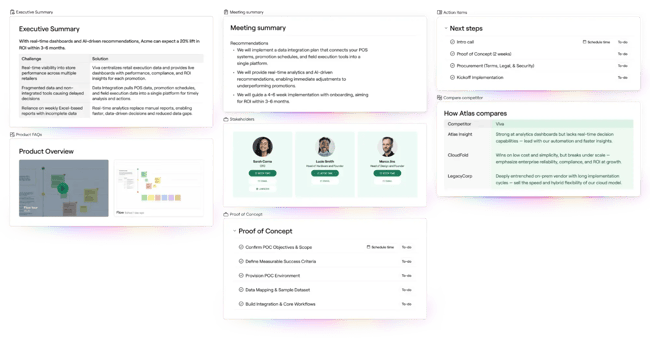
Reps upload transcripts with a couple of clicks into pre-built templates, then refine the output with their champion. The result is business cases that sound like the prospect’s voice. Lattice saw a 25% increase in late-stage win rates year over year by focusing on winning the second sales cycle and defending the spend through these AI-generated materials.
Deal Risk Detection and Intervention
Deal risk detection monitors engagement patterns, stakeholder involvement, and conversation sentiment to flag deals at risk of stalling. AI analyzes which decision-makers are absent from calls, whether budget discussions have taken place, and whether implementation timelines remain unclear.
When the system detects missing stakeholders or unanswered objections, it automatically creates tasks for reps and notifies managers. At Pynest, AI models assess the likelihood of deal closure and prioritize active opportunities, resulting in an approximately 22% increase in pipeline velocity.
Automated Call Summaries and Action Items
Automated call summaries generate structured summaries after every sales call, capturing next steps, open questions, and commitments from both parties. AI extracts action items, assigns owners, and sets deadlines based on conversation context.
These summaries flow directly into the CRM and shared deal rooms, ensuring every stakeholder — including those who missed the call — understands what happens next. When multiple stakeholders join late-stage calls, automated summaries prevent misalignment by documenting exactly what was agreed upon and who is responsible for each subsequent step.
Retention Automated Workflows
Retention stage automated workflows analyze post sale signals from product usage, support interactions, and account health to understand opportunities for proactive expansion and renewal motions. Customers churn when teams miss early warning signs or fail to capitalize on growth opportunities. AI workflow automation monitors engagement patterns, identifies risks before they escalate, and triggers the right touchpoints at the right time.
This stage’s workflow examples include:
Behavioral Health Scoring and Churn Prediction
Behavior health scoring analyzes product activity, support request frequency, and feature adoption patterns to predict churn risk before customers disengage. At Pynest, AI analyzes current customer behavior and identifies accounts that exhibit early warning signs, such as declining login frequency or an increase in support tickets.
After implementing this approach, retention increased by 15% because managers could respond promptly and in the right direction. The system automatically triggers outreach sequences when health scores decline, escalates high-risk accounts to customer success managers, and suggests specific interventions based on the factors driving the decline.
Usage-Based Expansion Triggers
Usage-based expansion triggers monitor feature adoption and usage thresholds to identify accounts ready for upsells or plan upgrades. When customers consistently hit usage limits or adopt advanced features, AI automatically flags expansion opportunities and creates tailored proposals showing ROI based on their actual usage patterns.
The workflow generates personalized upgrade messaging that references specific workflows the customer has already adopted, making the business case for expansion concrete rather than speculative. Sales and customer success teams receive alerts with recommended next steps, pricing options, and talking points grounded in the customer’s real product experience.
Note: All these AI-powered workflows can run natively inside HubSpot’s Sales Hub and Smart CRM, which centralize data, pipeline management, and follow-ups. This eliminates the need for multiple tools and ensures every workflow runs on clean, synchronized data.
How to Implement These AI Sales Workflows In HubSpot
Building AI-powered sales workflows in HubSpot follows a repeatable pattern that ensures clean data, proper routing, and measurable results. Start with clear goals, map the right data fields, and let AI handle the repetitive work while your team focuses on high-value interactions.
Step 1: Define your workflow goal and scope.
Start by identifying what you want the workflow to accomplish and which stage of the funnel it serves. Be specific about the outcome — “reduce response time for demo requests” is better than “improve lead follow-up.”
Determine which object type the workflow should use: contacts for lead nurturing, deals for pipeline management, tickets for support automation, or companies for account-based plays. In HubSpot, navigate to Automation > Workflows, then click Create workflow > From scratch or select a template aligned with your goal.
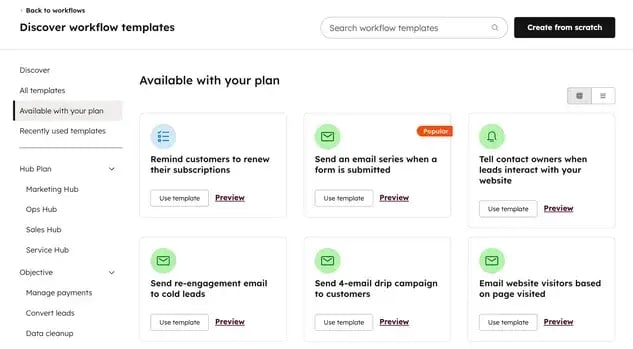
Step 2: Confirm required data fields and properties.
Before building triggers and actions, verify that the necessary data fields exist and contain accurate and clean information. Missing or inconsistent data will break automation before it starts.
Property mapping checklist:
- Lead source and campaign tracking fields are populated consistently
- Contact owner and deal owner assignments are current
- Lifecycle stage and deal stage values match your sales process
- Custom properties for industry, company size, and product interest exist
- Date fields for last activity, next follow-up, and renewal dates are accurate
In HubSpot, go to Settings > Properties to audit existing fields or create new ones. Use property validation rules to prevent bad data from entering the system.
Maintaining data integrity and compliance is crucial. Regularly audit lead source, lifecycle stage, and consent properties. Use validation rules to prevent incomplete data and document your AI workflow logic to stay transparent and compliant with privacy standards.
Step 3: Set up enrollment triggers.
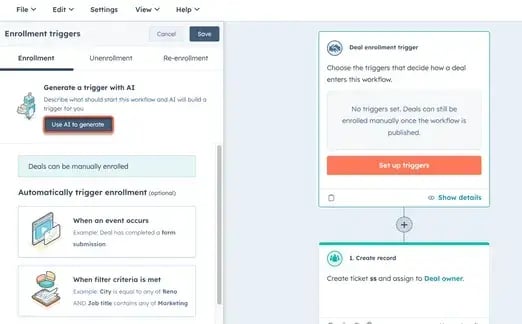
Enrollment triggers determine which records enter your workflow and when. Use filter-based triggers (when specific criteria are met), event-based triggers (when a particular event occurs), or schedule-based triggers (on specific dates).
To set triggers in HubSpot, click the Trigger enrollment box in the workflow editor. You can manually configure triggers or use Breeze to generate them with AI.
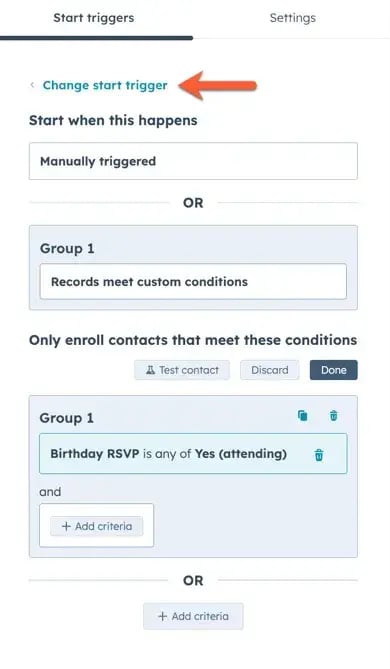
For AI-generated triggers, click Use AI to generate, describe what should trigger the workflow (like “contact submits pricing page form” or “deal enters decision stage”), then click Generate trigger.
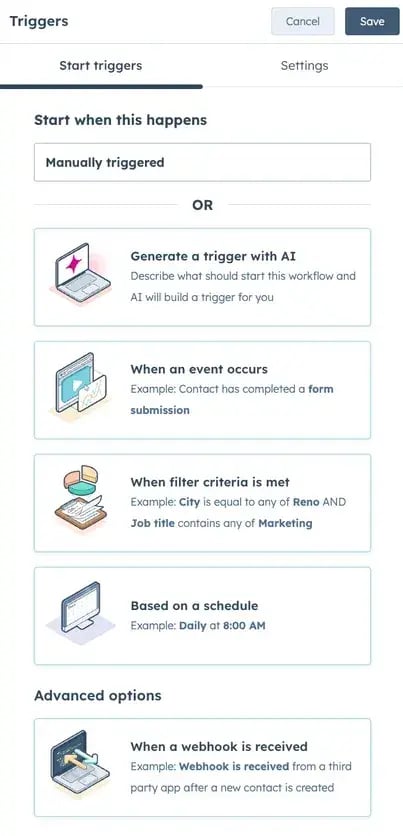
Review the suggested trigger and click Keep trigger if it matches your intent.
Common enrollment trigger examples by sales stage:
- Awareness stage: Form submission on specific landing pages, first website visit from target account
- Consideration stage: Demo attendance confirmed, pricing page visited 3+ times in 7 days
- Decision stage: Deal stage changes to “Proposal Sent,” new stakeholder added to deal
- Retention stage: Product usage drops below threshold, renewal date within 90 days
If your data isn’t perfect yet, start small. Build a simple workflow that automates demo scheduling or follow-up tasks. HubSpot’s AI can still work with partial data and improve accuracy as more fields get populated.
Step 4: Configure AI Logic and Actions.
Once triggers are set, define what actions the workflow should take. HubSpot’s Breeze can generate action sequences based on natural language prompts.
Click the + plus icon in the workflow editor, then select Use AI to generate. Describe the actions you want (for example, “send personalized follow-up email referencing their industry, create task for account executive, update deal stage”). Breeze will suggest a sequence of actions.
Review each generated action and customize as needed. You can add conditional logic using if/then branches to create different paths based on property values, engagement levels, or stakeholder involvement.
For Breeze agents that handle more complex reasoning and multi-step processes, visit the Breeze agents documentation to learn how to deploy autonomous AI workflows.
Action configuration tips:
- Personalize email content using contact and company properties
- Set task priorities and due dates based on deal value or urgency signals
- Route high-priority leads to specific team members using round-robin or territory rules
- Add delays between actions to avoid overwhelming prospects with simultaneous touchpoints
Step 5: Assign ownership and routing rules.
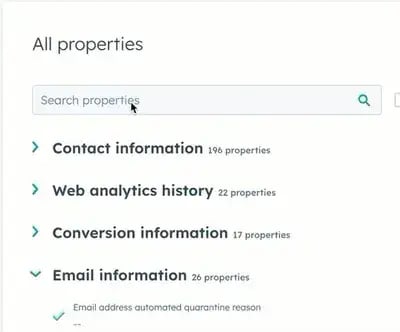
Proper owner assignment ensures the right team member handles each record. Head over to your recommendations, click the name of a record. In the left panel, click View all properties, search for [Object] owner, click the dropdown menu, then select an owner.
Create tasks for managers when high-value opportunities lack owner assignment after a set timeframe.
Step 6: Add measurement and reporting.
Before turning on the workflow, define success metrics. Track enrollment rates, action completion rates, time spent in workflow, and conversion outcomes.
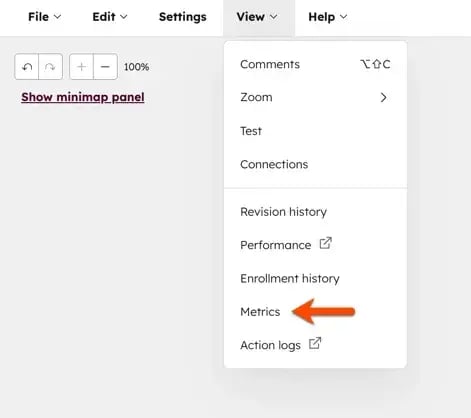
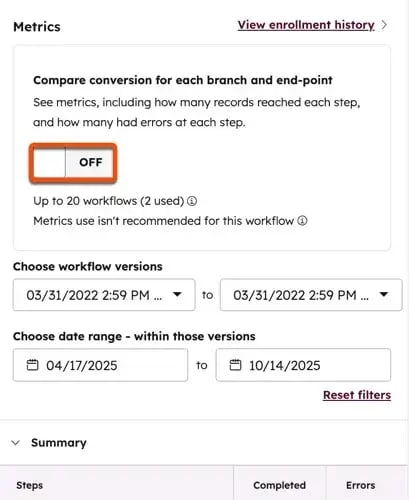
To track workflow performance, navigate to the workflow editor, click View > Metrics at the top, then turn on metrics tracking in the right panel.
You can also access workflow settings by clicking Settings in the top left of the workflow editor, where you can turn on “Compare conversion for each branch and end-point” to track conversion and performance metrics.
Set up internal notifications when workflows hit volume thresholds or when specific branches see unusual activity. This helps you catch issues before they impact outcomes.
Step 7: Test and turn on.
In the upper right corner of the workflow editor, click Review and publish. Decide whether to enroll existing records that currently meet the criteria or only enroll new records going forward.
Test workflows with a small segment first. Monitor the first 50-100 enrollments closely and check for data errors, timing issues, or unexpected branches. Once validated, expand enrollment criteria to your full target audience.
Tools and Integrations That Play Well With HubSpot
HubSpot centralizes sales automation by connecting to data sources, communication channels, and AI tools within a unified platform. The smart approach is to use HubSpot’s native features first, then add selective integrations only when specific capabilities are missing.
HubSpot pulls data from email, chat, social media, forms, and third-party intent providers, which are then integrated into a single customer record. This eliminates the fragmentation that slows teams down.
Key HubSpot tools for AI sales automation include:
- Sales Hub: Sales Hub is a core automation engine that manages sequences, tasks, pipeline tracking, and rep workflows. Handles lead routing, follow-up scheduling, and deal stage progression without manual updates. Teams can build multi-step sequences that adapt based on prospect behavior, ensuring every lead gets timely, relevant outreach.
- Breeze: Breeze is HubSpot’s native AI layer that generates email drafts, summarizes calls, scores leads, and suggests next actions based on historical patterns and buyer signals. The tool learns from your closed-won deals to identify which behaviors predict success. Breeze surfaces insights automatically so reps can act on opportunities faster without digging through data.
- Smart CRM: Smart CRM is an Intelligent database that enriches contact records automatically, identifies duplicate entries, and surfaces relationship insights so reps have complete context before every interaction. The system pulls firmographic data, social profiles, and company news to build complete prospect profiles. Smart CRM eliminates manual research time and ensures no rep enters a call unprepared.
- Claude connector: The Claude connector Integration brings advanced AI reasoning into HubSpot workflows, handling complex content generation, data analysis, and decision support that requires deeper contextual understanding. Claude can draft personalized proposals, analyze deal risk factors, and provide strategic recommendations based on conversation history. This extends HubSpot’s native AI capabilities for teams managing complex enterprise sales cycles.
Frequently Asked Questions (FAQs) about AI sales workflows
How do I choose the right triggers for AI workflows?
Choose triggers based on high-intent actions that signal buying readiness, such as pricing page visits, demo requests, competitor comparison downloads, or repeat website sessions within 48 hours. Avoid triggering on low-signal behaviors like newsletter opens or single blog reads.
Start by testing triggers with small segments first, measure conversion rates, then scale what works and remove what creates noise. Focus on actions that correlate with pipeline progression and closed deals.
How do I keep lead scoring and routing fair and compliant?
Keep lead scoring fair and compliant by auditing scoring models quarterly to ensure they don’t bias against protected characteristics or geographic regions. Document the criteria used for routing decisions and maintain transparency with your team about how leads are assigned.
Use round-robin distribution for similar-quality leads to prevent favoritism. Store consent records properly and honor opt-out requests immediately across all AI lead scoring workflows. Regular audits help identify and correct any unintentional bias in scoring algorithms.
Can I build these if my data is messy?
Yes, AI workflows can be built even with messy data, but start with cleaning the most critical fields first: contact owner, deal stage, company name, and lead source. AI workflows need accurate routing and scoring inputs to function properly.
Begin with simple automations that don’t require perfect data, like response time tracking or meeting scheduling. As you clean more records, gradually add complexity to your workflows and scoring models.
What is the best way to test an AI workflow?
Test AI workflows using parallel testing, where AI recommendations run alongside your current process without replacing it. Compare conversion rates, response times, and deal velocity between AI-assisted and manual approaches over 30 to 60 days.
Start with low-risk workflows like email subject line optimization before automating high-stakes activities. Monitor false positives, measure rep adoption, and gather feedback before rolling out broadly.
Can I run everything on one platform?
HubSpot handles most sales automation needs natively in one system: lead capture, scoring, routing, sequencing, pipeline management, and reporting. This unified approach reduces integration headaches and keeps data synchronized automatically.
Add selective integrations only when specialized capabilities are needed that HubSpot doesn’t offer, such as advanced intent monitoring or industry-specific data enrichment. Fewer platforms mean faster implementation and cleaner data.
Automate the busy work.
AI sales automation workflows are no longer optional for teams trying to scale without burning out. Personalized workflows capture leads faster, qualify smarter, nurture with precision, and flag risks before they derail deals.
I suggest starting small. Select one stage of your funnel, create a workflow, measure its impact, and then expand.
HubSpot’s Breeze AI makes this accessible without requiring a data science team. It learns from your wins, suggests what works, and automates the repetitive tasks that used to consume hours every week.
Whether you’re automating lead routing, qualification, or retention, each AI sales automation workflow directly connects data, action, and insight — helping teams move faster without sacrificing quality.
Ready to build your first AI sales workflow? Get started with HubSpot’s free CRM and Breeze AI tools today.
