
Enterprise territory management separates functional CRMs from those that can actually scale with businesses. When revenue teams add regions, weak territory logic creates gaps in coverage and disputes over lead ownership.

Zoho CRM and Microsoft Dynamics 365 both offer enterprise-grade territory features. Zoho offers straightforward rules-based assignments with clear hierarchy modeling. Dynamics 365 embeds territory logic deep into its account and opportunity structures, with power that requires more setup. Alternatives like HubSpot offer flexibility and the ability to map based on territories.
The question isn’t which platform has more features. Teams need to choose which one maps to how enterprises actually sell, grow, and manage complexity without breaking.
Table of Contents
- Microsoft Dynamics CRM vs. Zoho CRM at a Glance
- Microsoft Dynamics CRM vs. Zoho CRM for Territory Management
- Microsoft Dynamics vs. Zoho: Forecasting by Territory, Analytics, and AI Compared
- Which CRM ranks best for territory and deal management?
- Frequently Asked Questions About Microsoft Dynamics CRM vs. Zoho CRM
Microsoft Dynamics CRM vs. Zoho CRM at a Glance
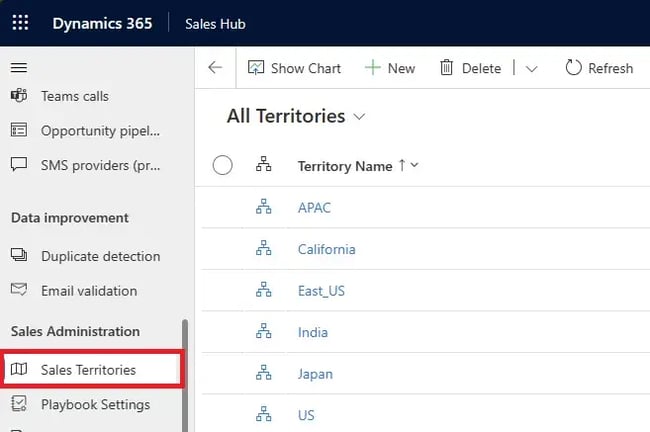
Microsoft Dynamics 365 serves enterprises with complex sales hierarchies and deep Microsoft ecosystem integration. The platform handles multi-layer territory trees, role-based security models, and advanced forecasting tied directly to territory performance.
Zoho CRM targets mid-market and growing enterprises that need capable territory logic without heavy IT overhead. Setup is faster, the interface is cleaner, and territory rules scale reliably for distributed teams managing thousands of accounts.
HubSpot Sales Hub takes a different approach, prioritizing ease of use and fast deployment. Teams can set criteria to manage territories. Once rules are set, information integrates smoothly with the broader revenue platform, making it a strong choice for teams that want clean assignment without extensive configuration. While hierarchy options are more streamlined than Dynamics or Zoho, implementation in HubSpot is faster, and the learning curve is gentler.
A team’s best fit depends on size, IT resources, and how granular the territory structure needs to be.
Microsoft Dynamics CRM vs. Zoho CRM for Territory Management
Territory management controls how leads and accounts get distributed across your sales team, who owns which regions or customer segments, and who can see what. Both Dynamics 365 and Zoho CRM handle enterprise territory needs, but they take different paths to get there.
Dynamics 365 handles complex team structures with multiple territory layers and detailed assignment rules. Zoho CRM offers similar power with faster setup and a simpler interface for admins running large teams. HubSpot Sales Hub makes the process easier, though it offers fewer options for deeply layered territory structures.
Multi-level Territory Hierarchies
Multi-level territory hierarchies allow users to nest territories inside one another. For example, teams can route in a hierarchy starting with region, then country, then the province within that area. This ensures performance metrics, pipeline, and forecasts automatically roll up from smaller territories to larger ones, giving leadership accurate visibility.
Microsoft Dynamics supports parent-child and sub-child territory structures using an org-chart-style view. Managers can see all child territories, and forecasting ties directly into the hierarchy. Geographic visualization is enhanced through Maplytics, which maps hierarchical territories. Overall, Dynamics provides solid hierarchy depth, though some advanced mapping relies on add-ons.
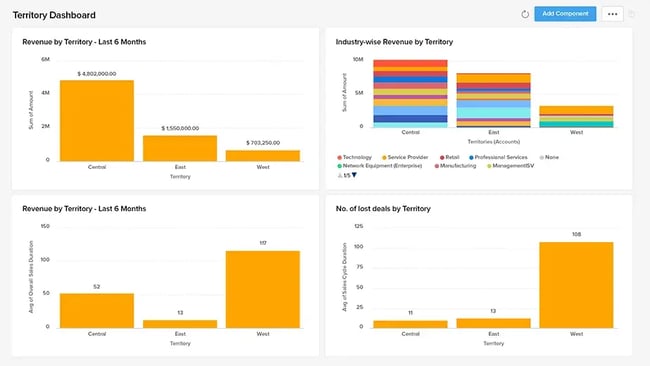
Zoho CRM enables teams to build territories and sub-territories from scratch or extend role hierarchies into territory models. Managers can define parent-child relationships, assign targets, and rely on automatic forecast rollups. Zoho’s approach is more native and easier to configure, particularly for teams that want hierarchy management without heavy technical setup.
HubSpot Sales Hub does not use traditional nested territory hierarchies in the same way as Dynamics or Zoho. Instead, HubSpot emphasizes team-based organization and custom properties (such as region, segment, or territory fields) to model coverage. Forecasts and reports can be filtered and rolled up by these properties, providing hierarchy-like visibility without requiring rigid territory trees.
Rules-Based Assignment Logic
Rules-based assignment logic automatically routes leads, accounts, and opportunities to the correct rep based on pre-defined criteria. This removes manual sorting, reduces errors, and helps prevent coverage gaps.
Microsoft Dynamics 365 includes dedicated assignment rules for leads and opportunities, with territory rules often handled through add-ons like Maplytics. It supports first-match rule processing and routing based on criteria.
Zoho CRM offers built-in assignment rules and territory rules that support highly granular, criteria-based logic using almost any field. Teams can also retroactively apply rules to existing records using a “Run Rules” function. This makes Zoho particularly effective for fast-moving teams that frequently adjust routing logic.
HubSpot Sales Hub uses workflow-based assignment rules to automate routing across leads, contacts, companies, and deals. Assignments can be triggered by virtually any CRM property, including geography. This workflow provides flexible, no-code routing that’s easier for non-technical teams to manage.
Geographic and Account-Based Routing
Geographic and account-based routing assigns records to reps based on location data or account attributes like industry, company size, or revenue band. This is especially important for field sales, regional teams, and vertical-based selling.
Microsoft Dynamics 365 allows territories to be defined by postal codes, states, and cities, with geographic visualization and routing optimization handled through Maplytics. Zoho CRM supports grouping accounts by geography, product line, or region. Zoho’s map widgets and Maply integration offer visual clustering.
HubSpot Sales Hub handles geographic and account-based routing through CRM properties and workflows rather than map-driven territory objects. Teams can assign ownership based on country, state, region, industry, or account tier, and use integrations for advanced mapping when needed.
Territory Performance Tracking
Territory performance tracking measures revenue, pipeline, and quota attainment at the territory level. It allows sales leaders to see which territories are hitting targets and where reps may need support.
Microsoft Dynamics 365 uses its Goals feature to define territory targets over custom time periods. Targets roll up from child to parent territories, and customized dashboards track performance against goals. Zoho CRM enables separate forecast targets per territory. Reports that evaluate performance by territory and roll forecasts and quotas through the territory structure.
HubSpot Sales Hub tracks performance through forecasting and dashboards rather than territory-specific objects. Teams can measure pipeline, revenue, and quota attainment by region, segment, or territory property, with real-time visibility into rep and team performance.
Role-based Access and Visibility Controls
Role-based access and visibility controls determine who can view, edit, or delete records based on role, team membership, or territory assignment. This ensures reps only see what’s relevant to them while maintaining data security.
Microsoft Dynamics 365 relies on security roles with Read, Write, and Delete scopes set by entity. There’s also user, business unit, and organization-level access. Territory visibility is often managed through business unit mapping, owners, and access teams.
Zoho CRM uses Profiles and Roles to define access levels, with territory-based permissions assigned during territory creation. Visibility is tied directly to territory membership.
HubSpot Sales Hub manages access through user permissions, teams, and record ownership, with visibility rules controlling which users can view or edit records. While HubSpot does not support territory-based permissions natively, teams can approximate territory visibility using team structures and filtered views.
Bottom-Line Takeaway for Buyers
Zoho CRM takes the edge for territory management with native territory objects, cleaner hierarchy implementation, and built-in assignment logic that doesn’t require add-ons. Dynamics 365 delivers strong capabilities but leans heavily on business unit mapping and partner tools to achieve similar results.
For teams that don’t need deeply nested territory hierarchies or complex multi-level structures, HubSpot Sales Hub offers a compelling alternative. Team-based hierarchies, workflow automation, and straightforward forecasting handle most mid-market territory needs without the configuration overhead.
HubSpot shines when speed and ease of use matter more than structural granularity, making it a strong fit for growing teams that want territory management without enterprise complexity.
Microsoft Dynamics vs. Zoho: Forecasting by Territory, Analytics, and AI Compared
Forecasting shows you which deals will close, where territories are falling short, and what revenue to expect. Analytics dashboards surface pipeline health, rep performance, and territory trends without building custom reports. AI adds predictive scoring, flags at-risk deals, and spots patterns across thousands of records faster than manual review.
The table below compares how each platform handles four critical forecasting and analytics capabilities:
- Territory-based forecast roll-ups aggregate pipeline value, quota attainment, and revenue projections from individual territories up through parent territories. Managers can see how sub-territories contribute to regional totals.
- AI-powered pipeline predictions use historical data, deal progression patterns, and activity signals to forecast which deals will close. Signals flag at-risk opportunities and estimate future revenue.
- Predictive deal scoring assigns each opportunity a numerical score based on historical win/loss patterns, deal characteristics, and engagement signals. With that information, teams can prioritize high-probability deals.
- Revenue trend analysis and insights track how revenue evolves over time across territories, segments, products, and channels to identify seasonal patterns. Teams can also spot growth or decline in specific regions.
Capability | Microsoft Dynamics 365 | Zoho CRM |
Territory-based forecast roll-ups | 4/5 Roll-up forecasting across hierarchical territories using Goals and Advanced Forecasting; child territory performance aggregates automatically; roll up multiple metrics; AI-assisted forecasting models improve accuracy for predicted revenue | 4.5/5 Dedicated territory forecasts with quotas and targets; forecasts roll up based on territory hierarchy; assign different forecast targets per user per territory; Zia AI insights provide territory-level forecast risks and best-case scenarios |
AI-powered pipeline predictions | 4/5 Forecasting & Pipeline Intelligence module identifies pipeline risks and surfaces deals likely to slip; predicts revenue based on current pipeline behavior; integrates with AI/ML add-ons like Predict4Dynamics; works best with strong CRM data | 4.5/5 Built-in Zia AI scores leads and deals by likelihood to win; Prediction Builder creates custom field prediction models; flags anomalies between targets and achievement; accessible without heavy customization |
Predictive deal scoring | 4.5/5 Built-in Predictive Opportunity Scoring based on historical won/lost data; displays “Top Reasons” influencing each score; includes a trend indicator; requires a minimum of 40 closed won and 40 closed lost opportunities | 4.5/5 Zia AI predicts deal conversion likelihood; scores deals as likely to win, likely to lose, or uncertain; Prediction Analytics shows score, model accuracy metrics, and trends; QuickML enables custom models without coding |
Revenue trend analysis and insights | 4/5 Built-in “Sales Trends” module studies revenue patterns over time across organization levels; Sales Insights add-on surfaces revenue performance by segments; Power BI integration visualizes revenue swings and territory-level roll-up trends | 4.5/5 Zia AI provides Trend Dashboards with line charts showing metrics over time; Zoho Analytics supports multi-dimensional insights; revenue reports visualize net revenue by geography or product without heavy custom setup |
Both platforms deliver strong forecasting and AI capabilities, with Zoho edging ahead on native territory-based forecasting and built-in AI that requires less configuration. Dynamics 365 matches Zoho’s predictive deal scoring and offers powerful analytics through Power BI integration. However, some features require add-ons or advanced editions.
HubSpot Sales Hub provides solid forecasting and AI through its Breeze suite, with team-based forecast roll-ups and AI-powered deal scoring. HubSpot delivers clean dashboards, intuitive trend analysis, and fast setup that appeal to teams prioritizing ease of use over deep territory-specific analytics.
Which CRM ranks best for territory and deal management?
Microsoft Dynamics 365 Sales offers one of the most mature territory management systems on the market. It’s built for enterprise sales cycles that demand deep customization, robust forecasting, and advanced analytics. Meanwhile, Zoho CRM handles enterprise deal management effectively for growing and mid-sized teams.
Microsoft Dynamics supports true multi-level hierarchies and offers flexible modeling. The platform handles geographic, account-based, and rules-driven assignments effectively. Its integration with Power BI enables sophisticated reporting, while advanced approval workflows and AI-driven insights support multi-region pipelines.
Zoho CRM provides a solid native territory module that includes hierarchical territory structures, automatic assignment rules, and forecasting. The platform handles deal management effectively, offering flexible pipelines, predictive scoring through Zia, and strong reporting capabilities. The system is easy to configure and benefits from Zia AI insights, though advanced geographic visualization and routing often depend on external tools.
HubSpot Sales Hub takes a different approach that resonates with teams tired of heavyweight CRM complexity. Instead of dedicated territory objects and business unit mapping, HubSpot uses team hierarchies and workflow automation to handle territory assignment and forecasting. This means faster implementation, cleaner user adoption, and less IT overhead.
For deal management, HubSpot excels at pipeline visibility, AI-powered deal scoring through Breeze, and seamless handoffs between marketing and sales. The CRM platform prioritizes usability and speed over structural depth, creating a system reps can easily navigate.
Teams prioritizing intuitive dashboards, quick setup, and integrated customer journeys may find HubSpot’s approach more effective than platforms with deeper feature sets but steeper learning curves.
Frequently Asked Questions About Microsoft Dynamics CRM vs. Zoho CRM
Which is better for complex territory hierarchies and approvals?
Microsoft Dynamics 365 handles deeply nested territory structures when mapped to business units, though territory-specific visibility requires configuration. Zoho CRM offers native territory hierarchies with built-in permissions and approval workflows tied to territory membership.
For complex multi-level territories with granular access control, Zoho‘s dedicated territory object provides cleaner implementation than Microsoft Dynamics’ business-unit approach.
Can I start on Zoho CRM and migrate later without major disruption?
A Zoho to Microsoft Dynamics migration is feasible but requires planning. Standard objects (contacts, accounts, deals) transfer through data export/import or migration tools. Custom fields, workflows, and territory structures need manual reconfiguration in Microsoft Dynamics.
Budget 60-90 days for enterprise migrations, including data mapping, user training, and parallel testing. Starting with clean data architecture in Zoho reduces future migration friction.
Do I need extra modules for journey orchestration or advanced analytics?
Dynamics 365 requires Sales Insights for AI forecasting and predictive scoring; Power BI handles advanced analytics. Zoho includes Zia AI and basic analytics natively, though Zoho Analytics adds dimensional reporting. HubSpot bundles journey orchestration and analytics in Enterprise tiers.
What’s the best way to pilot before a company-wide roll-out?
Start with one territory or product line (50-100 users) for 60-90 days. Configure core workflows and measure adoption. Run parallel systems briefly to validate data migration and integrations. Collect feedback from reps and managers before expanding. Successful pilots prove ROI and surface configuration issues early.
Making the right choice for your enterprise territory needs.
Microsoft Dynamics 365 delivers the strongest territory management for complex enterprise structures, with deep hierarchies. Zoho CRM offers solid territory features with faster setup and built-in AI through Zia, making it a strong fit for mid-to-large teams.
HubSpot Sales Hub stands out for teams that need territory management without the complexity. Team-based structures, simple automation, and AI forecasting handle most territory needs. When setup speed, ease of use, and tight sales-marketing alignment matter as much as advanced features, HubSpot provides the cleanest path forward.
Ready to see how HubSpot handles territory management for your team? Explore HubSpot Sales Hub to get started.
