Customer care tools are platforms that help businesses manage customer support interactions across multiple channels while maintaining unified customer records. These tools do much more than manage support tickets — they let customers reach teams across all channels (email, chat, social media, self-service) and unify that data into a single customer record, giving support teams the context necessary to provide fast, informed, and personalized care. 
Customer care tools combine ticketing, automation, and CRM data to help teams scale as the company grows, without sacrificing service quality or consistency. The best customer care tools include AI-powered features to help reps resolve cases quickly and empower customers to help themselves through self-service options.
As AI continues to reshape customer service, businesses need platforms that deliver the highly personalized service, fast resolutions, and minimal wait times that modern customers expect. Choosing the right customer care platform helps you build a scalable, AI-ready foundation that maintains quality as volume increases. This guide, breaks down what customer care software is, what features to look for, and the best tools to consider, including HubSpot’s all-in-one Service Hub.
Table of Contents
- What is customer care software?
- Features to Look for in a Customer Care Platform
- Best Customer Care Tools You Should Consider
- How AI Features Change Customer Care Workflows
- How to Onboard AI Features in Your Customer Care Platform
- Frequently Asked Questions About Customer Care Tools
What is customer care software?
Customer care software (also called customer care tools) is a centralized platform that manages customer service interactions across all channels, integrating ticketing systems, knowledge base content, and CRM data to deliver seamless support experiences. With all interactions unified in one place, service teams provide personalized support while using automation to resolve requests quickly and consistently.
Growing teams often start with simple help desk or shared inbox software, but these lightweight tools become limiting as businesses scale. Comprehensive customer care platforms like HubSpot’s AI-Powered Customer Service Platform help companies expand support operations without proportionally increasing headcount by automating routine tasks and streamlining workflows.
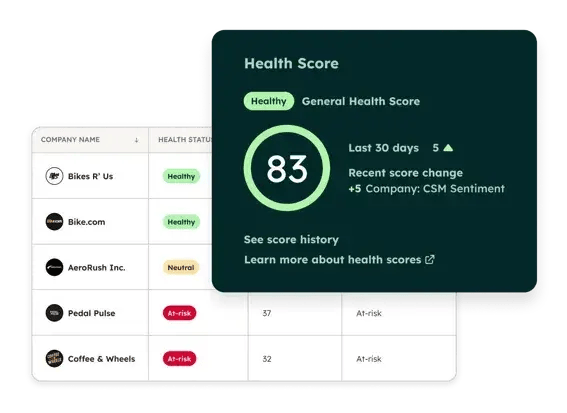
Modern AI transforms what‘s possible in customer care. As a former support rep, I spent significant time on routine requests like password resets and basic walkthroughs — tasks today’s AI handles instantly. Tools like HubSpot’s Breeze automatically respond to customer requests while referencing customer history and approved knowledge base content. Some Breeze users report up to 77% reduction in support volume through AI automation, freeing reps for complex issues requiring human expertise.
The right customer care software is an integral part of an AI-ready foundation that scales with your business. Unified platforms like HubSpot’s Service Hub help you avoid tool sprawl by keeping your CRM, automation, and AI capabilities tightly connected from day one.
Features to Look for in a Customer Care Platform
The top features of modern customer care software center on efficiency, collaboration, and delivering a consistent, personalized customer experience across every channel. Below are the must-have features I recommend prioritizing in 2026.
As a former HubSpot support rep, I can speak from experience about how crucial it is for representatives to have tools that empower them to solve customer problems efficiently. I‘m particularly impressed by today’s AI features — capabilities I would have loved when I was handling support tickets.
AI assistance that suggests relevant knowledge base articles or helps auto-complete emails completely changes the nature of support work, freeing reps from repetitive tasks to focus on complex cases requiring human judgment.
An excellent customer care platform doesn‘t just reduce handle time with automation — it helps reps become more confident, collaborative, and creative. That’s fulfilling for teams and satisfying for customers who receive consistently high-quality support.
Omnichannel Support
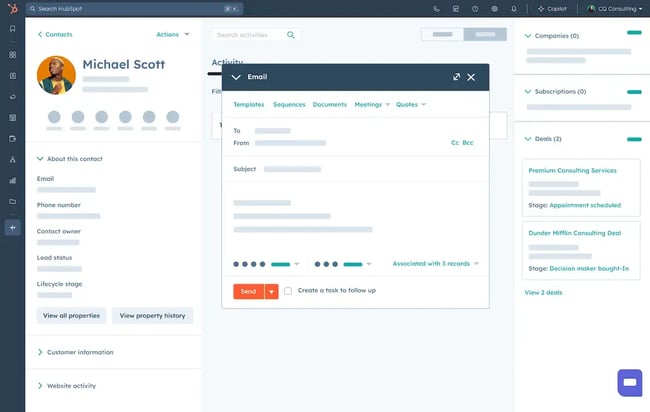
Omnichannel support means providing customers with multiple ways to contact your team while maintaining a single, unified source of truth for all interactions. Customers today expect to reach you wherever they are. That means email, live chat, social media, phone, or a self-service portal.
Your customer care platform should connect all these channels into a single, shared inbox so reps can respond to customers without switching tools or losing context.
Pro tip: HubSpot’s Shared Inbox lets teams manage every conversation from a single unified view, keeping response times low and ensuring reps always have relevant context.
CRM Integration
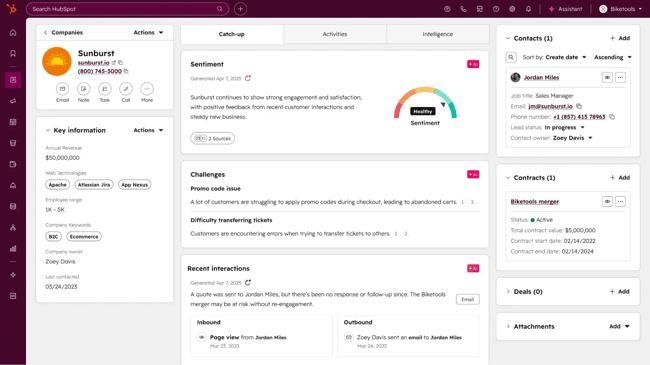
CRM integration is critical for stitching together all your customer data into a single record, enabling reps to personalize support interactions with the full context of a customer’s service history, like past tickets, purchases, and preferences.
Pro tip: HubSpot’s Smart CRM automatically syncs your service, sales, and marketing data, giving your service teams a 360-degree view of the customer journey for personalized and measurable interactions.
Automation
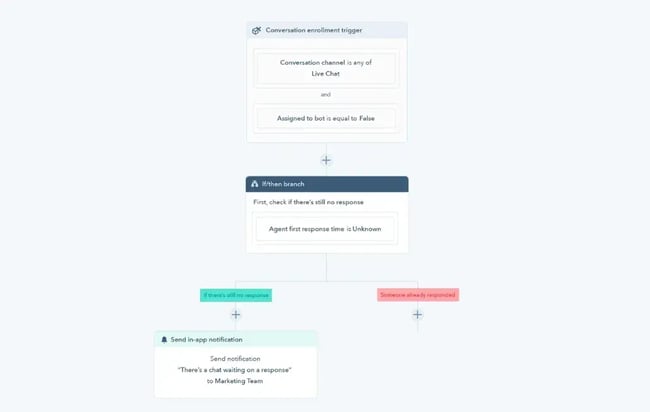
In customer care software, automation refers to rules and workflows that automatically route, escalate, or resolve tickets. It handles repetitive tasks, so teams can focus on the conversations that actually require human attention. Look for built-in workflow tools that can auto-assign tickets, send follow-up emails, or trigger internal alerts.
Pro tip: HubSpot’s Service Hub offers automation that can route tickets by priority or topic, escalate urgent issues, and notify managers in real time.
AI-Powered Assistance
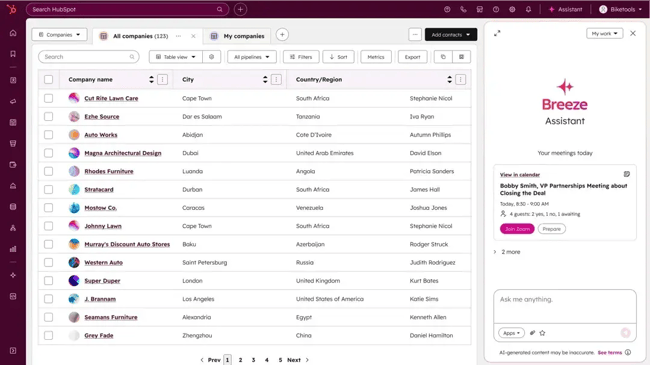
AI-powered assistance combines machine learning and generative models to expedite ticket routing, responses, and content recommendations. AI features are no longer optional for customer care tools; they are essential for high-quality, scalable support.
Modern customer care solutions feature AI-powered capabilities such as intelligent ticket assignment, generative replies, and AI-suggested knowledge base content that streamline reps’ workflows, improve accuracy, and reduce average handle time (AHT).
Pro tip: HubSpot’s Breeze Customer Agent analyzes ticket context, drafts replies, and even resolves basic inquiries automatically, freeing up agents from repetitive cases so they can focus on complex interactions that require a human touch.
Knowledge Base Management

A robust knowledge base empowers customers to find answers themselves, increasing customer satisfaction and reducing the load on your support team. It’s also an invaluable customer support training resource that ensures internal consistency by providing reps with a reliable, up-to-date source of information.
Your customer care platform should make it easy to publish, categorize, and update knowledge content into an attractive, easy-to-use knowledge base for both reps and customers.
Pro tip: HubSpot’s Breeze Knowledge Base Agent automatically turns successful support interactions into knowledge documents and help articles, creating a knowledge base that grows smarter with each interaction.
Reporting and Analytics
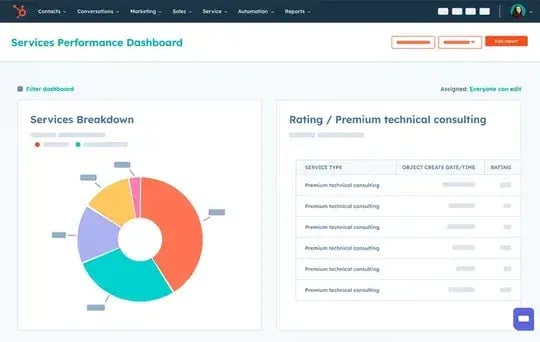
Excellent customer care tools provide a comprehensive view of support team performance through advanced reporting and analytics. Look for built-in dashboards to track support metrics, such as average handle time, net promoter score (NPS), and customer satisfaction score (CSAT), to analyze performance and make data-informed decisions. Accurate analytics enable managers to identify bottlenecks and improve team performance.
Best Customer Care Tools You Should Consider
Tool | Scale Fit | Omnichannel Capability | AI Capabilities | CRM Integration Depth | Why Choose It |
HubSpot Service Hub | Small → Enterprise | Strong native omnichannel (email, chat, social, forms) | AI agent, agent assist, generative AI, knowledge base AI | Deep native Smart CRM | • Unified platform that scales with your team• Avoids tool sprawl with built-in CRM + AI• Strong automation and self-service |
Zendesk | Mid-Market → Enterprise | Strong omnichannel support | AI agent and agent assist | Integrations required for full CRM view | • Advanced reporting and customization• Mature marketplace ecosystem• Ideal for complex support orgs |
Intercom | Startup → Mid-Market | Strong omnichannel + in-app chat | AI agent (Fin), agent assist, conversation summaries | CRM integrations available (not native) | • Best for conversational, personalized support• Great in-app experience for SaaS• Flexible AI tone + escalation settings |
Hiver | Small → Mid-Market | Primarily email | AI suggestions and workflows (developing) | Native to Google Workspace | • Easiest adoption for Gmail-based teams• Minimal learning curve for reps• Lightweight alternative to full platforms |
Grammarly Business | All team sizes (supplemental tool) | Not a ticketing or omnichannel platform | Generative writing assistance, tone, and clarity improvements | Integrates with help desks, email, and collaboration tools | • Improves clarity, tone, and professionalism• Reduces revision time for written replies• Strengthens brand consistency across reps |
1. HubSpot Service Hub
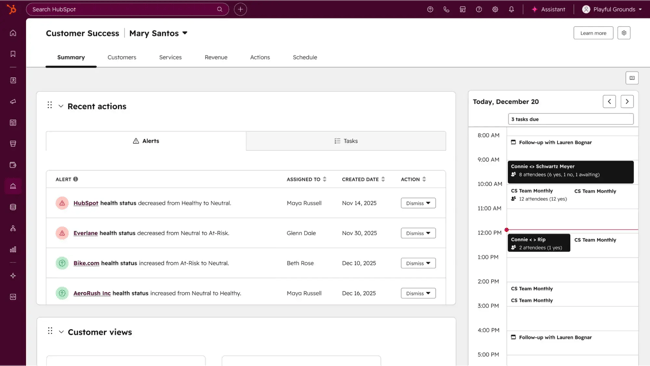
Best for: Growing companies that want an all-in-one customer care platform connected to their CRM.
HubSpot Service Hub is an AI-powered, omnichannel customer care tools solution that runs on HubSpot’s Smart CRM, so every interaction lives in one platform. Features like AI customer and knowledge base agents, intelligent routing, automated workflows, and a shared omnichannel inbox create a seamless customer support experience that reduces wait times and enhances retention.
HubSpot’s CRM integration capabilities are what set it apart. If you use HubSpot CRM or other HubSpot tools for sales and marketing, Service Hub is an obvious choice. Native integration with HubSpot’s tools automatically consolidates all your customer data, a process that’s usually costly and time-consuming with other tools.
HubSpot’s CRM integration provides support teams with immediate access to all key customer information, including previous support interactions, purchases, conversions, feedback, and more. With a holistic view of the customer journey, service teams can deliver personalized support that increases satisfaction and fosters customer loyalty.
HubSpot Service Hub is an excellent customer care solution for growing teams and startups. Unlike some help-desk tools that you can quickly outgrow, HubSpot can scale with you. Its Breeze AI agent can automatically handle customer inquiries while intelligently referencing your knowledge base content for absolute consistency.
The result? Reduced load on your support team, and the ability to grow your organization without needing to increase headcount to offset volume.
Key Features
- Shared inbox and omnichannel messaging (email, chat, social, forms)
- AI-powered automation and workflows
- Breeze AI Agents for ticket resolution, generative replies, and knowledge suggestions
- Integrated knowledge base
- Real-time analytics for CSAT, NPS, and handle time
What I like
As a former support representative, I can’t emphasize enough how crucial it is to have a unified view of customer data at a glance. I appreciate that HubSpot provides all the information a representative could need right at their fingertips, simplifying daily workflows and helping reps deliver higher-quality support.
I also like HubSpot’s Breeze AI agents. When I was in support, sharing knowledge base documents with customers was a regular part of my process. Breeze AI can automatically analyze customer tickets and intelligently suggest helpful knowledge content to reps. If that feature had been available when I was a rep, it would have made my workflow much more efficient.
Even more impressive, Breeze AI can analyze successful tickets and automatically convert their resolutions into how-to guides and walkthroughs, creating a self-sustaining, consistently updated resource for both reps and customers.
- Free plan available
- Starter: $9/user/mo
- Professional: $90/user/mo
- Enterprise: $150/user/mo
2. Zendesk
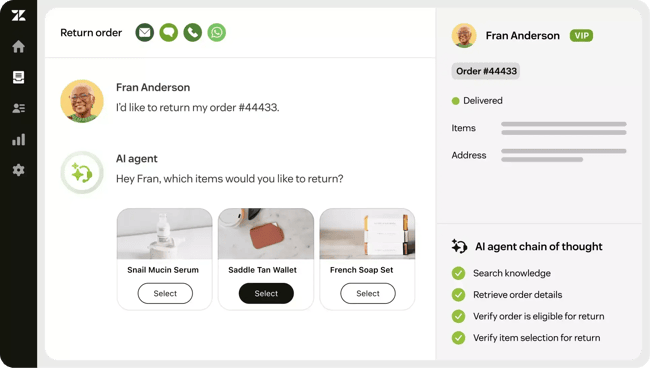
Best for: Companies seeking deep customization and advanced reporting features.
Zendesk is a highly respected customer care tools platform that checks all the boxes for many types of organizations. It offers omnichannel ticketing, detailed reports, a self-service knowledge base, and AI agents that can automate up to 80% of everyday customer interactions.
Key Features
- Advanced AI agents
- Omnichannel ticketing system
- Advanced analytics and reporting
- Customizable live chat widget
What I like
The first thing that struck me about Zendesk was its attractive and intuitive interface. From an agent’s perspective, I could envision myself working seamlessly within the tool on a day-to-day basis without any headaches. I particularly enjoyed the customer interaction timeline, which clearly displays customers’ previous interactions so reps can personalize support based on their prior experiences.
During the demo, I enjoyed the agent auto-assist feature, which intelligently provides suggested replies for tickets. I found it easy to reference the auto-assist’s quickly suggested reply to understand the case, and then edit the response for personalization and to match my tone.
- Support Team: $19/user/mo
- Suite Team: $55/user/mo
- Suite Professional: $115/user/mo
- Suite Enterprise: $169/user/mo
3. Hiver
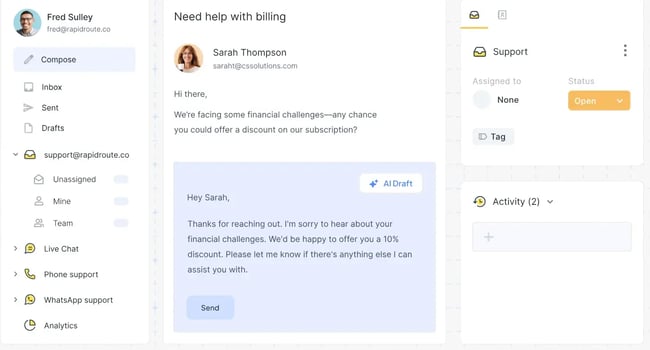
Best for: Teams that rely heavily on Gmail and Google Workspace
Hiver is a customer care solution that supercharges your existing Gmail interface, transforming it into a comprehensive customer support tool. For teams already familiar with and dependent on Gmail and Google Workspace, Hiver boosts adoption and minimizes the learning curve since reps are already used to the Gmail interface.
Hiver also offers AI features to streamline customer support. However, these features are available as add-ons at an additional cost, and I found that standard features like AI-suggested responses, AI workflows, and AI-automated customer replies are still in development.
Key Features
- Deep Gmail integration
- Skill-based routing
- Performance analytics and custom reports
- Shared inboxes
What I like
I appreciate that Hiver offers a solution for small businesses and startups to get started quickly with a customer care tool that’s naturally intuitive and familiar. I have two small companies: my original band and my instrument backline rental business.
I rely on Gmail for both, and I see how beneficial it would be to stay within that ecosystem rather than switching to a completely different platform as customer care needs evolve.
- Free plan available
- Growth: $25/user/mo
- Pro: $65/user/mo
- Elite: $105/user/mo
4. Grammarly Business
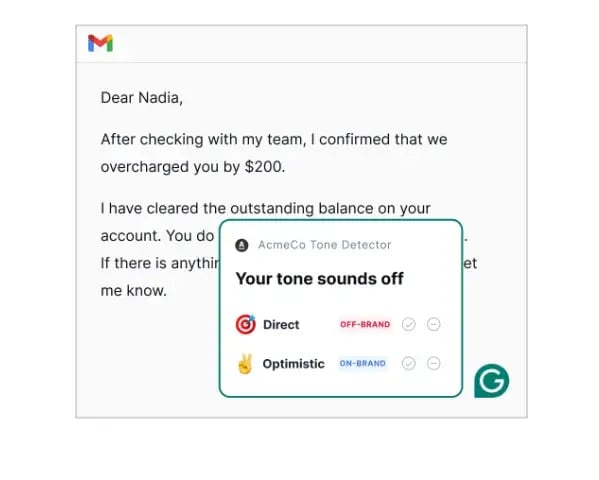
Best for: Customer care teams that primarily communicate via email or chat and want to ensure consistent, empathetic, and professional messaging.
Grammarly Business is an AI-powered communication assistant that helps teams write clearer, more polished customer responses across email, chat, and documentation tools. It integrates directly with popular platforms such as HubSpot, Zendesk, Gmail, Outlook, and Slack, helping customer-facing reps maintain a consistent brand voice and tone. Grammarly’s real-time feedback ensures that messages are confident, error-free, and aligned with company communication standards.
Unlike other tools on this list that offer a complete customer care platform, Grammarly is a supplemental tool that enhances communication and streamlines email writing for reps. As a standalone customer care tool, it lacks the ticketing and advanced automation features necessary to run a support team. However, when combined with another customer care platform, it elevates consistency and accuracy in customer communications, helping reps resolve cases faster and better satisfy customers.
Key Features
- Real-time Grammar, tone, and clarity suggestions
- Brand style guide and consistency enforcement
- Integration with email, help desks, and CRMs
- Team analytics and writing quality scores
What I like
I use Grammarly myself when writing HubSpot posts and customer-facing content, so I know firsthand how helpful it is for catching minor errors and sharpening tone. For customer care teams, that same clarity directly translates into better customer experiences.
I especially appreciate how the tone detector adapts to my writing style, flagging sentences that don’t match my usual tone and suggesting alternative versions that are more empathetic, confident, or direct.
Grammarly is an invaluable tool in my writing process. I particularly like how the Generative AI rewriting feature can instantly suggest smoother, more natural phrasing for sentences or concepts I find difficult to articulate, which is especially useful for customer service reps who need to be clear, empathetic, and direct when explaining complex ideas.
- Free plan available for individuals
- Pro: $12/user/mo
- Enterprise: Pricing upon request
5. Intercom
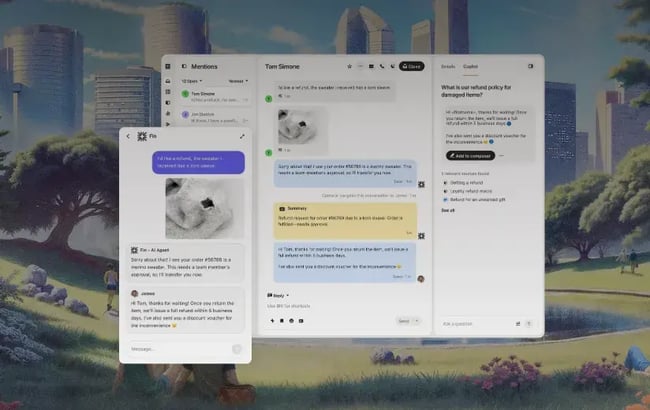
Best for: SaaS and digital-first companies that want personalized, conversational customer support.
Intercom is a customer care platform best known for pioneering in-app chat and conversational, proactive customer support tools. Today, Intercom provides comprehensive omnichannel customer care tools, including live chat, help center resources, and an AI-powered chatbot, Fin, which can automatically handle routine requests.
Intercom also offers AI agent assistance and conversation summaries to accelerate response times while maintaining personalized support interactions. Intercom’s Fin AI agent and AI agent assist features make it an outstanding choice. As a former support rep, I understand how it can streamline workflows and help reps close more cases each day.
However, Intercom tends to be more expensive, and AI features incur additional costs, which is worth considering, since other options like HubSpot offer similar solutions at a lower price with deep CRM integration.
Key Features
- Fin AI agent
- Automated routing and workflows
- AI-assisted knowledge base management
- Omnichannel help desk and ticketing
- Copilot AI agent assistant
What I like
Intercom shines at creating human-like conversations with Fin, their AI agent. During the demo, I was impressed by how smooth and natural it felt to talk with their AI. I explored Fin’s backend and was amazed at how deeply I could customize Fin’s personality and tone, and at how I could define exactly how it should handle certain customer situations and when to escalate to a human representative.
- Essential: $29/user/mo + $0.99 per Fin resolution
- Advanced: $85/user/mo + $0.99 per Fin resolution
- Expert: $132/user/mo + $0.99 per Fin resolution
How AI Features Change Customer Care Workflows
AI is transforming customer service by automating routine tasks, providing instant access to knowledge, and supporting agents in real time. Modern AI features are designed to make human representatives faster, smarter, and more empathetic. In practical terms, AI handles repetitive tasks while humans focus on building relationships.
Customer care AI features fall into four core categories: agent assist, generative replies and summaries, smart classification and routing, and specialized AI agents that can handle entire customer interactions.
These AI-powered customer care features can streamline reps’ workflows, enabling them to handle more cases more effectively with less burnout. However, it’s essential to onboard your team to these features thoughtfully to build a scalable customer care team that consistently delivers top-notch service.
AI Agent Assist
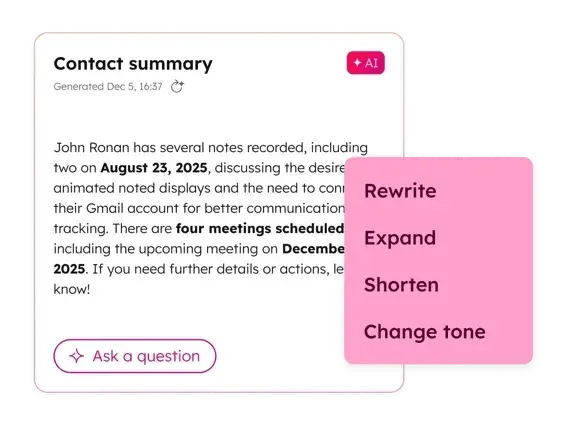
Agent assist tools analyze incoming tickets and customer messages, then surface relevant knowledge base articles, templates, or snippets in real time. They act like an intelligent co-pilot, providing reps with the correct information exactly when they need it.
In HubSpot’s Service Hub, Breeze Agent Assist automatically suggests next steps, relevant documentation, or even draft responses based on the ticket’s context.
When I was a support rep, I relied heavily on our knowledge base content as a reference. I also routinely sent customers how-to guides and relevant knowledge base articles to help them help themselves. But digging for the right article took time, and that time adds up fast.
Agent assist tools eliminate that lost time by automatically surfacing the best content for each case, freeing up reps to help more customers.
Generative Replies and Summaries
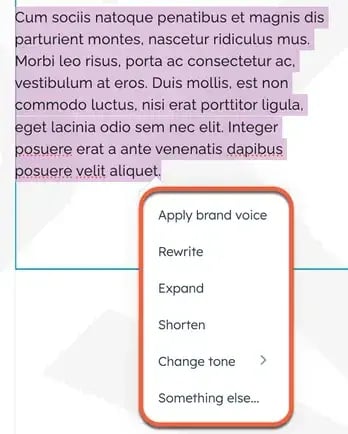
Generative AI can automatically generate responses, summarize lengthy threads, and even rewrite messages to improve tone and clarity. It’s essential in high-volume environments where consistency is key.
For example, if a customer sends a detailed email about a billing issue, an AI tool can summarize the conversation and suggest a brief, courteous reply, reducing handling time while maintaining a consistent tone.
When I was a support rep, I often spent a lot of time rephrasing the same messages for different customers and trying to understand what customers were saying in their sometimes unclear emails. Today’s generative AI tools can automatically interpret customer messages and recommend suitable responses, significantly speeding up agent workflows.
Classification and Routing
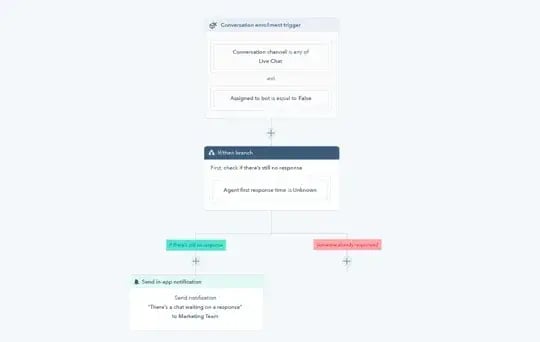
AI classification and routing use natural language processing (NLP) to analyze incoming messages and determine intent, urgency, and topic. Tickets are automatically assigned to the right rep or queue, eliminating manual triage.
This capability ensures customers get faster responses from the people best equipped to help them. It also reduces burnout for reps by cutting down repetitive administrative work.
Pro tip: HubSpot’s automation workflows let you combine AI-based intent detection with traditional rules so that you can route both by topic (“billing,” “account access”) and by customer priority or lifetime value.
Specialized AI Agents
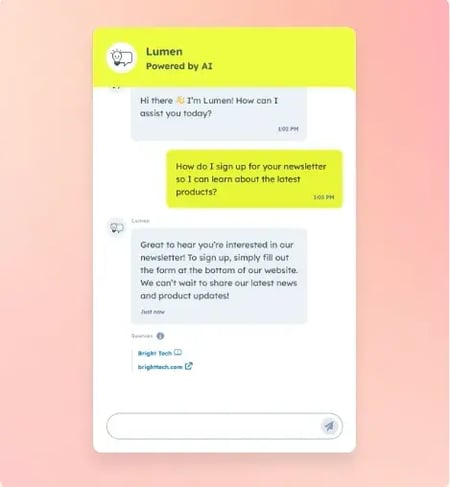
AI agents like HubSpot’s Breeze can autonomously resolve simple customer requests such as password resets, tracking updates, or appointment scheduling. These agents draw from approved knowledge base content and customer records, ensuring accuracy and brand alignment.
Specialized agents free human reps to focus on complex or emotional cases that require empathy and creativity, providing customers with quick solutions for simple issues and personalized support when necessary.
How to Onboard AI Features in Your Customer Care Platform
Introducing AI features into your customer care platform requires a thoughtful rollout plan. A smooth onboarding process starts with setting expectations for your reps, training your AI, and maintaining human oversight.
Start small and communicate clearly
AI adoption works best when it’s gradual and transparent. Begin with low-risk workflows, such as ticket categorization or internal summaries, before expanding to customer-facing automation and AI agents.
Communicate clearly with your team about what the AI does and doesn’t do, and position it as an agent enhancement tool that eliminates frustrating parts of the job and streamlines workflows.
Pro Tip: AI tools mitigate support volume and reduce rep burnout, helping them succeed and allowing them to focus on rewarding, complex issues. Position this positive perspective clearly in your onboarding to increase adoption.
Train AI using your existing knowledge base
Your AI is only as good as your documentation. Before rollout, audit your knowledge base and canned responses to ensure they’re accurate, consistent, and on-brand. AI features like Breeze Knowledge Agent automatically surface or even draft help articles, but they rely on strong foundational content.
Set guardrails for tone, escalation, and accuracy
Complex and sensitive customer issues require a human touch. When rolling out an AI agent, define clear guardrails for when and how your AI should hand off a case to a human rep. Many AI tools can automatically escalate highly negative customer interactions using sentiment analysis. You can also create simple rules and trigger points for human escalation, such as billing disputes over a specific dollar amount or if an AI fails to solve an issue after a certain number of attempts.
In addition, you can configure AI agents like Breeze to reference your brand style guide and tone, ensuring consistent, on-brand communication that feels authentic rather than robotic. If you don’t already have brand guidelines for tone, develop these assets beforehand so you can begin training your AI right away.
Measure success using handle time and CSAT
Faster isn’t always better if customer satisfaction drops. While metrics such as Average Handle Time (AHT) and Ticket Deflection Rate are valuable indicators of efficiency, they must be balanced with Customer Satisfaction (CSAT).
When launching AI features, closely monitor how response speed affects CSAT. If efficiency rises but satisfaction falls, the AI’s tone or suggested solutions need coaching and adjustment.
AI agents are not a set-it-and-forget-it solution. They’re like another teammate that requires reviews, training, and data-based performance analysis to ensure a consistently high-quality customer experience.
Implement a continuous feedback loop
Successful AI deployment relies on constant refinement. Set up an easy process for reps to flag inaccurate AI suggestions, confusing automated responses, or workflow gaps that create friction. Every piece of feedback helps your AI get smarter and prevents minor issues from becoming systemic problems.
Feedback is critical for making these tools more helpful over time, so don’t leave any valuable information on the table.
Pro tip: The reps who use AI tools daily are your most valuable source of truth. I recommend sending weekly or monthly surveys to gauge reps’ experience with AI tools and reinforcing your feedback loop through one-on-one conversations.
Frequently Asked Questions About Customer Care Tools
Do I need a help desk or a full customer care platform?
Teams need a Help Desk if the primary goal is to efficiently manage technical incidents and provide reactive support, typically through a few channels like email and a portal. Teams need a full customer care platform when the goal is omnichannel service consistency, customer loyalty, and leveraging service data to drive proactive business growth.
If a team is growing or plans to adopt AI, a customer care platform offers stronger scalability and prevents tool sprawl as volume and channels increase.
How do I estimate the total cost of ownership for customer care software?
Total cost of ownership includes the first-year setup cost plus recurring annual expenses. Beyond license fees, factor in implementation, data migration, training, integrations, and admin time. A simple benchmark is to assess costs across these areas:
- Acquisition: Year-1 licenses, setup, migration, integrations, training
- Ongoing: Renewals, AI/usage fees, support, admin & training
Evaluate your total cost over 2-3 years for a realistic understanding of the software’s cost.
How long does migration typically take?
Migration timelines vary based on data volume, system complexity, and required integrations. Most small to mid-size teams can migrate to a new customer care platform within 2–6 weeks, including data import, configuration, and training. Larger or highly customized systems may take two to three months to transition fully.
Which AI features actually reduce handle time?
AI reduces handle time by automating repetitive steps in the support process. The most significant impact areas are AI-generated replies, automatic conversation summaries, AI-based routing and classification, and agent assist tools that surface relevant knowledge instantly. These features shorten handle time without sacrificing quality or personalization.
How do I minimize disruption during rollout?
Minimize disruption by gradually rolling out AI and new tools, starting with low-risk workflows. Provide clear expectations, training, and feedback channels, and maintain human oversight during early adoption. Pilot with a small group first, refine based on real usage, then expand to the whole support team.
Choosing the right customer care tools
Customers expect fast, personalized, and consistent support across every channel. Customer care tools make that possible by unifying communication, integrating with CRMs, and leveraging AI to automate routine inquiries — giving teams the space to focus on meaningful, human interactions.
Platforms like HubSpot Service Hub help growing teams scale efficiently with omnichannel messaging, powerful automation, and AI agents that enable reps to work smarter while maintaining high-quality, personalized service.
AI-powered customer care tools are redefining the support role for the better. Having worked on a support team before AI existed, I’m excited for the next generation of reps who can focus on creative problem-solving, building deeper customer relationships, and advancing into specialized or leadership roles because mundane tasks no longer weigh them down.
