Real estate professionals work with a diverse range of clients, property types, price points, and locations every day. To manage client and property information, they often have to juggle a bloated stack of tools, including email platforms, lead portals, marketing systems, spreadsheets, messaging apps, and more.

But what if everything they needed lived in one system, and that system could also automate tedious tasks like writing emails, ranking leads, recommending listings, and scheduling follow-ups?
That’s exactly what an AI-powered CRM is built to do. It centralizes information, automates repetitive tasks, and provides real estate teams with a better way to manage the entire client journey. This article breaks down everything needed to evaluate AI CRMs for real estate.
Table of Contents
- What is an AI CRM for real estate?
- Features to look for in AI CRM real estate software
- Best AI CRMs for real estate agents
- Integrations that matter in real estate CRM with AI
- How to pilot an AI CRM in a brokerage
- Scale your real estate company with HubSpot Smart CRM
- Frequently Asked Questions about AI CRMs for real estate
What is an AI CRM for real estate?
An AI CRM for real estate is a customer relationship management system that uses artificial intelligence to automate, optimize, and personalize interactions with clients and manage internal workflows.
Unlike traditional CRMs that primarily store data and require manual input, an AI-powered CRM actively analyzes data to predict client needs, score leads, and personalize communications, allowing agents to focus on high-value activities and close more deals.
A good AI CRM real estate platform supports day-to-day work in the field by:
- Using AI agents and chatbots to handle initial queries and conversations
- Scoring and prioritizing prospects based on their likelihood to convert to paying customers
- Analyzing local market data to help teams with property valuations and investment opportunities
- Analyzing client preferences and budgets to recommend properties that match their needs
- Performing routine tasks, such as updating contact records, generating contracts, and sending status updates
- Using AI-powered dashboards to show agents how leads move through the pipeline, where communication stalls, and which marketing channels deliver the highest-quality prospects.
Features to look for in AI CRM real estate software
Here are the core features that matter most for businesses evaluating real estate AI CRM software:
1. Contact and property database
A good AI CRM keeps every client profile, property record, showing note, and communication thread in one place. This makes it easy for agents to track active deals, revisit past conversations, and understand a client’s full history before reaching out.
When property data and client data sit side by side, agents can work faster and keep the pipeline organized.
2. AI-powered lead scoring and prediction
AI lead scoring prioritizes leads based on behavior, source, and engagement.
The system analyzes behavior signals, inquiry patterns, and channel engagement to identify which buyers or sellers are closest to making a buying decision.
This reduces the time agents spend on low-intent leads and gives teams a more accurate view of which opportunities need attention now. It also helps brokerages allocate time and resources where they’ll have the most impact.
3. Automated lead nurturing through personalized communication
Instead of manually sending follow-ups, a good AI CRM can automatically send tailored emails, texts, and alerts based on each contact’s preferences, search activity, or property interests. These automated touchpoints help real estate agents save time and create a consistent experience that feels personal, even when managing hundreds of leads.
4. 24/7 AI chatbot support for initial inquiries
An AI chatbot can answer prospects’ questions about listings, neighborhoods, availability, pricing, and scheduling at any time of day. It can also capture new leads when agents are busy or off-duty and immediately log those details into the CRM. This prevents missed opportunities and keeps response times quick.
5. Lead routing
Real estate companies often handle multiple neighborhoods, property types, and buyer segments, so routing rules matter. The CRM can assign each new lead to the right agent based on specialty, location, price point, or workload. This ensures prospects always work with someone equipped to help them quickly.
6. Sales forecasting
With access to lead quality, deal velocity, and seasonal market shifts, the CRM can project expected sales and commission volume. This helps team leads understand upcoming revenue, plan staffing, and set realistic monthly or quarterly goals.
7. Workflow automation
AI-powered CRM can automatically execute tasks like updating deal stages, sending contract reminders, logging new inquiries, and tracking inspection deadlines — all without manual input. This reduces errors and gives agents more time to spend on showings, negotiations, and client relationships.
8. Advanced analytics
AI-powered reporting dashboards can reveal which marketing channels deliver the highest-quality real estate leads, which agents have the strongest conversion rates, and where deals stall in the pipeline.
This helps teams refine their strategies, adjust budgets, and continuously improve their sales process.
Best AI CRMs for real estate agents
AI CRM for real estate automates lead capture, scoring, routing, and follow-up. With so many platforms now offering AI-driven features, it helps to know which AI CRMs truly help agents work efficiently, stay responsive, and close more deals.
Here’s a clear breakdown of the top five AI CRM options:
1. HubSpot Smart CRM
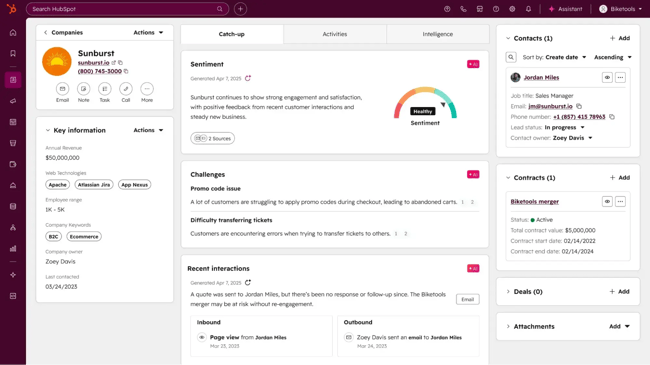
HubSpot Smart CRM is an AI-powered platform that centralizes customer activity and turns it into actionable insights. It unifies contact, deal, and communication data across marketing, sales, and service functions, so businesses (including real estate firms) can create personalized experiences at scale.
Breeze AI powers the entire HubSpot platform with a comprehensive suite of AI tools that helps teams automate workflows and improve operations.
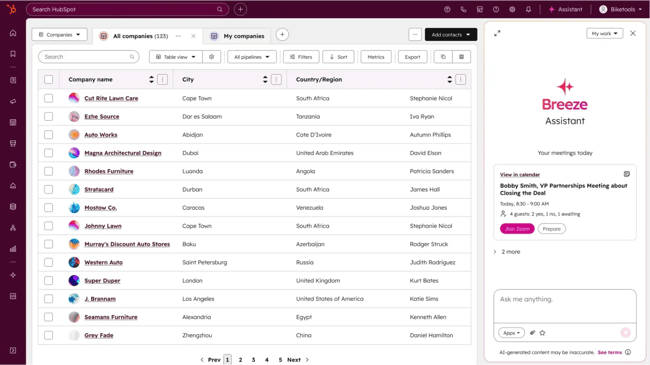
This suite consists of two parts:
- Breeze Assistant: A practical, always-available AI helper that lives inside the CRM. It drafts emails, summarizes records, prepares meeting notes, writes property descriptions, and creates content based on the company’s actual CRM data. This helps busy teams reduce admin work while keeping every interaction on-brand and informed by real context.
- Breeze Agents: These autonomous AI “teammates” handle deeper, end-to-end workflows. Each agent specializes in a specific function — prospecting, customer support, social media, or knowledge management — and operates continuously in the background. Examples include:
- The Prospecting Agent researches target accounts, identifies buying signals, and sends personalized sales outreach to qualified leads automatically.
- The Customer Agent uses existing help articles and website content to answer customer queries instantly and route complex issues to human agents when needed.
- The Social Media Agent creates and schedules platform-specific posts optimized for reach and engagement based on performance data and industry best practices.
- The Knowledge Base Agent surfaces content gaps and drafts help articles based on real tickets, thereby keeping your documentation current without consuming your team’s time.
Together, these capabilities make HubSpot’s Smart CRM an intelligent operational hub rather than a passive data store.
Key features of HubSpot Smart CRM
- Unified customer data: Smart CRM consolidates structured data, unstructured conversations (like calls and emails), and external signals across all customer-facing functions, including marketing, sales, service, content, operations, and commerce. This eliminates data silos between departments.
- AI-powered data enrichment: The CRM automatically enriches contact and company records with data from various sources, including HubSpot’s proprietary dataset of over 200 million business profiles.
- It also uses AI to detect and remove duplicates, fill gaps, and update outdated details without manual intervention. For brokerages, this ensures lead records stay accurate as prospects move, change jobs, or update their contact information.
- Flexible CRM views: Teams can switch between Kanban boards, timeline views, maps, charts, and other visual layouts to match specific workflows. This makes it easier to review active buyers, evaluate deal stages, or prioritize follow-ups during busy listing periods.
- Team governance and security: Real estate firms can organize teams/users with granular tools and field-level permissions. This way, admins can control who sees financial data, who can edit deal stages, and who can access client documents.
- Features like SSO and 2FA strengthen data protection, which is essential for brokerages handling sensitive client information.
- Workflow automation: Smart CRM automates everything from new lead alerts to client follow-ups. Predefined workflows can also trigger Breeze Agents, allowing AI to complete time-consuming tasks without human intervention. This keeps deals moving, saves time, and ensures no lead is left unattended.
- Customization and extensibility: The CRM offers a flexible data model with custom objects, event tracking, and scoring models, allowing businesses to adapt the platform to their unique processes. It also integrates with over 2,000 popular business apps through the HubSpot Marketplace.
Pricing
There are two pricing tiers:
- Professional: Starts at $50/month per seat
- Enterprise: Starts at $75/month per seat
2. Follow Up Boss
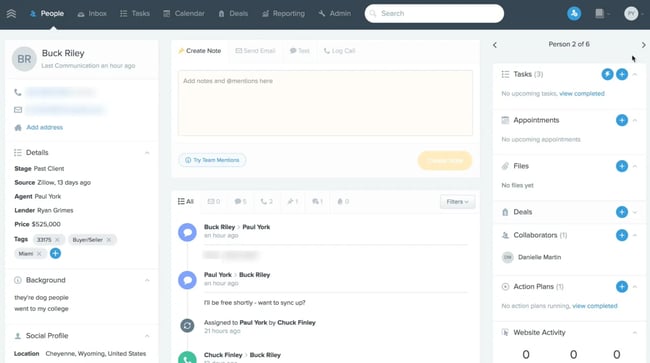
Follow Up Boss (FUB) is a real estate-focused CRM that helps agents, teams, and brokerages capture leads, manage communication, and move prospects through the pipeline.
It connects to 200+ lead sources, including Zillow, Realtor.com, and Facebook, so teams can work from a single central system instead of jumping between platforms.
Key features of Follow Up Boss
- Lead management and distribution: FUB captures leads from major portals and websites, then routes them using rules such as round-robin, “first to claim,” or ZIP-code and price-based filters. This keeps response times fast and ensures each lead reaches the right agent.
- Smart lists: These dynamic lists sort and prioritize leads automatically based on activity, engagement, or overdue tasks. This way, agents always know who to contact next without having to manually review their database.
- Integrated communication: All calls, texts, and emails appear in a single timeline for each contact. This gives teams full visibility into every interaction, making collaboration and handoffs smoother.
- Built-in calling and texting: Agents can call or text directly from FUB using a dedicated business number. Features like automatic logging, recordings, transfers, and quick templates streamline day-to-day communication. Group texting also makes it easy to update multiple contacts, which is useful for open house follow-ups or listing alerts.
- AI assistant: The built-in AI assistant summarizes calls, recommends follow-up tasks, and drafts personalized messages using conversation history. These features help agents stay organized without needing extra tools or subscriptions.
- Automated action plans: FUB Action Plans send drip emails and texts, create tasks, and set reminders automatically. This keeps long-term follow-up consistent, even for leads that aren’t ready to buy yet.
- Reporting and analytics: Dashboards display lead source quality, agent productivity, response times, and conversion metrics. These insights help brokerages coach agents more effectively, understand which channels deliver the strongest ROI, and identify bottlenecks that slow deals.
Pricing
Follow Up Boss offers a 14-day free trial. The paid plans start at $58/month per user with an additional $33/user for the dialer (billed annually).
3. Freshsales (by Freshworks)
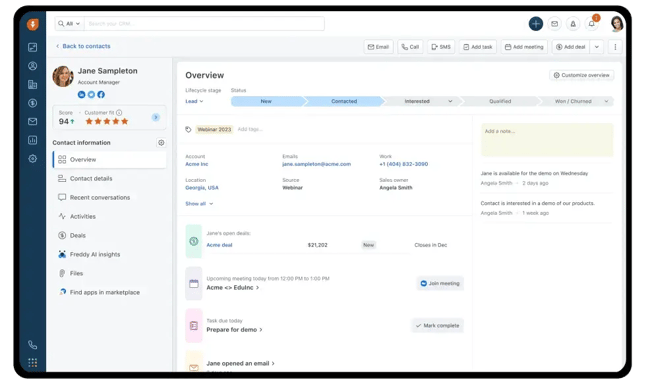
Freshsales, built by Freshworks, is an AI-powered CRM designed to help sales teams manage pipelines, qualify leads, and close deals more efficiently. It brings customer data, communication, and activity into a single cloud-based platform, giving teams a complete, real-time view of every prospect’s journey.
Key features of Freshsales
- Lead and contact management: Freshsales captures leads from forms, emails, chat widgets, and other inbound sources, then organizes them into clear profiles. It also automatically tracks activity, making it easier for teams to qualify prospects and identify who is ready to move forward.
- AI-powered assistance: Freshsales AI assistant, Freddy AI, supports teams with:
- Lead scoring: Prioritizes prospects based on engagement and likelihood to convert.
- Deal insights and forecasting: Predicts deal outcomes, flags risks, and suggests next action
- Content generation: Drafts personalized outreach emails and summarizes communication threads.
- Omnichannel communication: Freshsales offers two-way email syncing, built-in calling with recording and logging, and live chat. It also connects with WhatsApp Business, Facebook Messenger, and Instagram DM, so all conversations flow into the same timeline.
- Sales pipeline management: Teams can manage deals through a visual, drag-and-drop pipeline (Kanban view) that tracks deals through various stages, identifies bottlenecks, and forecasts revenue. Higher-tier plans support multiple pipelines for teams that handle different property types or sales cycles.
- Sales automation and workflows: The platform automates repetitive tasks like follow-ups, lead assignments, and deal updates using predefined rules. This keeps agents focused on active clients rather than on administrative work.
- Mobile app: Freshsales’ mobile app gives agents full access to contacts, meetings, call logs, and pipeline updates while on the move. It’s especially useful for field teams managing showings, inspections, or back-to-back client appointments.
Pricing
Freshsales offers a 21-day free trial. The paid plans for the CRM start at $9/month per user.
4. Lone Wolf Relationships
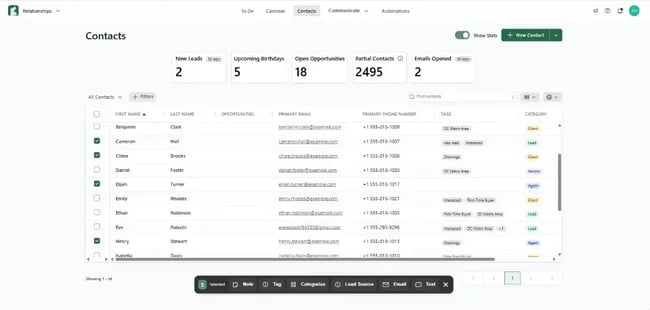
Lone Wolf Relationships is a real estate–specific CRM built to help agents manage leads, communicate with clients, and stay organized without the complexity of traditional CRMs.
It executes practical, everyday workflows, such as capturing inquiries, consistently following up, and managing client details, so agents can maintain strong relationships throughout the buying or selling process.
Key features of Lone Wolf Relationships
- AI-powered communication: The platform includes an AI assistant that drafts personalized, professional emails in seconds. It helps agents respond quickly, maintain a consistent tone, and reduce the time spent crafting routine messages.
- Unified inbox and built-in texting: All emails and texts appear in a single inbox, giving agents one place to manage conversations. The system also supports 1:1 or bulk texting with a local area code number, making it easier to send updates or follow-ups.
- Automated follow-ups (Action Plans): Agents can build or use pre-set drip campaigns that send scheduled emails, texts, and reminders. These automated touchpoints keep leads warm and ensure no one slips through the cracks during busy seasons.
- Task management and tracking: Agents can automate tasks, set reminders, and review upcoming activities on a clean dashboard. This makes it easier to stay on top of deadlines, follow-up steps, and active opportunities.
- Calendar syncing: Lone Wolf Relationships syncs with Google and Outlook calendars, so appointments, reminders, and follow-ups appear in a single unified schedule. This reduces double-booking and keeps daily planning simple.
- Integration with the Lone Wolf ecosystem: Because it’s part of the broader Lone Wolf platform, client data flows directly into tools like Lone Wolf Transact for transaction management and Lone Wolf Boost or Cloud CMA for marketing. This creates a connected workflow, from lead capture to closing and post-sale engagement.
Pricing: Not publicly available. Request pricing.
5. Lofty
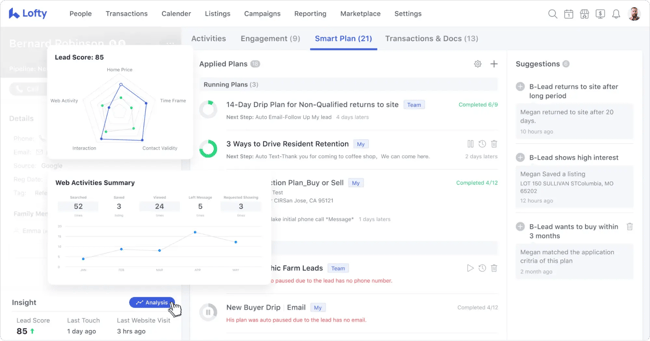
Lofty is an all-in-one real estate platform that blends an AI-driven CRM with integrated marketing, lead generation, and transaction tools. It’s designed as a full operating system that helps agents, teams, and brokerages manage the entire client journey in a single interface, from the initial search to final settlement.
Key features of Lofty
- AI-powered Smart CRM: The CRM sits at the center of Lofty and uses AI to help agents work more efficiently. It offers:
- Dynamic lead scoring: Ranks prospects automatically based on behavior, engagement, and property preferences so agents can focus on the strongest opportunities.
- AI assistant: Engages visitors through website chat and text, asks qualifying questions, and books appointments around the clock.
- AI Copilot and content generation: Drafts emails and texts, summarizes conversations, and analyzes client activity to recommend helpful next steps.
- Integrated IDX websites: Lofty offers customizable, SEO-optimized IDX websites that sync directly with the CRM. These sites track visitor activity, capture lead information through valuation tools and registration prompts, and feed all engagement data back into the CRM for better targeting.
- Marketing automation (Smart Plans): Smart Plans are highly customizable, automated email and SMS campaigns that nurture leads over the long term. Agents can tailor sequences for buyer, seller, past-client, and cold-lead workflows to maintain steady communication without manual input.
- Built-in communication tools: A built-in multi-line dialer accelerates outbound calling and keeps activity logs organized. There’s also a unified inbox that centralizes calls, texts, and emails, providing a complete communication timeline for every contact.
- Lead generation services: Lofty offers lead generation programs, including Google PPC, social ads, and direct mail, to help real estate businesses scale their client base.
- Mobile app: The iOS and Android app lets agents manage leads, track communication, and stay responsive while in the field.
Pricing: Not publicly available. Request pricing.
Integrations that matter in real estate CRM with AI
Real estate companies rely on a wide mix of platforms to manage leads, listings, communication, contracts, and day-to-day operations. Because the CRM stores the company’s critical contact and property data, it needs to integrate seamlessly with other tools the company relies on.
Here are some integrations an AI-powered CRM for real estate should offer:
Real estate industry platforms
1. Multiple Listing Services (MLS)/Property Portals
The system should integrate with MLSs and property portals like Zillow and Realtor.com to automatically pull (and update) property listings, including photos, pricing, and status changes, directly into the CRM. This eliminates manual data entry and ensures teams always work with the most accurate, up-to-date property data.
2. Property management systems
For firms involved in both sales and rentals, integrating with property management software (e.g., MRI Property Tree) provides a single, unified view of tenant information, lease renewals, maintenance requests, and occupancy data. This way, teams can access all operational details without switching between tools.
Communication and marketing tools
1. Email and calendar platforms
A two-way sync with platforms like Gmail, Outlook, Google Calendar, and Office 365 lets teams track every conversation and meeting automatically. Each email, appointment, and follow-up reminder is logged in the client’s CRM record, which ensures agents never lose track of scheduled showings or negotiation deadlines.
2. Communication channels (SMS, WhatsApp, Voice)
Integrating various communication tools ensures all interactions (calls, texts, live chats) are logged within the client’s record. AI-powered voice and text agents can answer questions, qualify leads, and book appointments around the clock.
When these conversations sync back into the CRM, agents see the full communication trail without manually logging activity.
3. Social media platforms
The system should integrate with social media platforms (e.g., Facebook, Instagram, and LinkedIn) to enable agents to capture leads from ads directly in the CRM. These integrations give agents visibility into how prospects engage with each campaign and make it easier to retarget high-intent audiences.
With centralized social data, marketing teams can adjust budgets and creative based on real performance patterns.
4. Marketing automation platforms
Integration with marketing automation tools like Mailchimp or ActiveCampaign allows real estate teams to send personalized emails and drip sequences based on client activity or saved properties. This way, they can deliver timely updates (like new listings, price drops, and local market insights) without having to write messages one by one.
Transactions and operations management tools
1. Document and e-signature solutions
Integrating with e-signature platforms like DocuSign or Documate streamlines the document workflow from offer to closing. Real estate teams can generate contracts, send them for signature, track progress, and store documents securely inside the CRM.
This improves compliance and removes the friction of managing paperwork across multiple systems.
2. Accounting software
Integrating with accounting tools like QuickBooks and Zoho Books helps real estate teams maintain accurate financial records by automatically syncing commissions, invoices, expenses, and transaction payments.
This helps brokers track profitability and keep books clean during busy transaction cycles.
3. Project and task management tools
Integration with tools like Asana or Trello helps coordinate inspection schedules, appraisal deadlines, and closing activities. This makes it easier for teams to manage long, multi-step transactions involving clients, attorneys, lenders, and inspectors.
With tasks synced back to the CRM, everyone stays aligned on what needs to be done next.
AI and data enhancement tools
1. Predictive analytics and valuation models
Integrations with valuation platforms such as HouseCanary give the CRM access to richer pricing insights, neighborhood data, and market-movement predictions. This helps agents provide more precise valuations and identify the strongest investment or listing opportunities based on real-time data.
2. Third-party integration services
Integrating with tools like Zapier extends the CRM’s functionality by connecting it to thousands of other apps. This lets teams build custom workflows (e.g., sending alerts, syncing form submissions, or updating spreadsheets) even when a native integration isn’t available.
How to pilot an AI CRM in a brokerage
When a brokerage wants to introduce an AI CRM for real estate, a structured pilot is the safest way to understand how the system behaves with real leads, real agent workflows, and real transaction timelines.
Here are the steps to pilot an AI CRM in a brokerage/real estate firm:
Step 1: Define the scope and success metrics
A brokerage needs to decide exactly what the pilot will cover—usually a specific team, location, or segment of the business. Once the scope is clear, leadership should set performance indicators to determine whether the CRM is worth expanding across the organization.
Useful success metrics include:
- Lead response time, which measures how quickly agents engage new inquiries after the CRM automates lead intake and routing.
- Lead conversion rate, which tracks how many AI-qualified leads move to appointments, offers, or closings.
- Manual workload reduction, which evaluates how much admin work the AI removes from the team.
- Pipeline accuracy, which shows whether forecasting becomes more reliable with AI insights.
- Agent adoption rate, which indicates how easily agents learn and adopt the system.
Each metric helps leadership understand whether the CRM is not only functional but also improving day-to-day performance.
Step 2: Clean and prepare the existing data
AI tools make more accurate predictions when the data they train on is clean, up-to-date, and structured.
A brokerage should remove duplicate contacts, merge fragmented records, verify listing details, and delete dead leads before the pilot begins. This gives the CRM a dataset that reflects the market and avoids confusing the AI model with outdated information.
Step 3: Set up the core integrations
AI CRMs need visibility into the brokerage’s communication and listing workflows to work well. Integrating foundational tools (like email, calendars, communication channels, MLS feeds, and marketing platforms) early gives the CRM a real-time view of client behavior.
This setup stabilizes the pilot because the CRM receives complete, accurate signals from day one, instead of relying on disconnected data sources.
Step 4: Configure lead management workflows
The brokerage should map its real-world processes into the system before testing. This includes:
- Setting scoring rules based on the brokerage’s definition of intent
- Creating routing logic tied to agent specialties or territories
- Building automated follow-up sequences that reflect the team’s voice
- Mapping deal stages to the brokerage’s sales model
When the CRM mirrors the team’s existing workflows, the pilot shows how well the system improves what the brokerage already does (rather than forcing agents to relearn their entire process).
Step 5: Train a small but diverse test group
A pilot works best when it includes different types of agents, including top performers, mid-level agents, and newer hires.
Each group interacts with leads differently, so their combined feedback will give leadership a realistic view of the CRM’s learning curve, the clarity of AI-driven suggestions, and whether the system supports both experienced and less experienced agents equally well.
Step 6: Monitor AI-driven outputs daily
Leaders should pay close attention to AI-powered suggestions in the early stage of the pilot, especially as the system adapts to new data.
Some AI signals a brokerage should review daily include:
- Lead scores, which show whether the AI correctly identifies high-intent clients.
- Automated follow-up messages, which ensure tone, accuracy, and timing match the team’s standards.
- Routing decisions, which confirm that leads land with the right agents.
- Forecasting suggestions that reveal whether AI can reliably predict deal velocity or revenue.
- Property recommendations that evaluate whether the AI understands client preferences.
Daily monitoring keeps the pilot on track and helps teams quickly refine any misaligned automation.
Step 7: Collect feedback and refine the setup
Weekly review sessions let the test group share what improves their workflow, where AI falls short, and which tasks still require manual effort.
Leadership can refine scoring rules, adjust automations, tweak messaging, or revise routing logic as feedback comes in, so the CRM becomes more aligned with real-world needs throughout the pilot.
30-day real estate AI CRM pilot plan
The plan below gives brokerages a structured way to test the CRM’s AI features, evaluate operational impact, and collect enough evidence to decide whether a full rollout is worth it.
Week | Focus Area | Actions to take |
Week 1 | Set-up and data foundation |
|
Week 2 | Live lead handling |
|
Week 3 | Full pipeline testing |
|
Week 4 | Performance review and rollout decision |
|
Scale your real estate company with HubSpot Smart CRM
Of all the top AI CRM options in this guide, HubSpot Smart CRM is the strongest choice for real estate teams looking for a system that’s powerful, flexible, and genuinely AI-driven. Its advantage comes from how deeply AI and automation are embedded across the platform, how customizable the system is, and how seamlessly it connects to the rest of the HubSpot ecosystem.
Embedded AI through Breeze Assistant
Breeze Assistant lives inside the CRM and helps with everyday tasks like drafting emails, summarizing client records, preparing meeting notes, and generating follow-up messages. It works directly with your real estate data, reducing admin work and keeping agents focused on active clients.
A library of customizable Breeze AI Agents
HubSpot offers autonomous AI agents that can handle tasks such as researching prospects, drafting and scheduling social posts, turning call transcripts into follow-up emails, and delivering quick product or pricing information to prospects. Teams can also customize existing agents or build new ones to support specific workflows.
A fully unified HubSpot ecosystem
HubSpot Smart CRM connects directly with every Hub in the HubSpot platform (i.e., Marketing, Sales, Service, Content, Commerce, and Data Hubs), so every team works from a single source of truth. This unified data layer improves AI accuracy, reporting, and compliance.
It provides teams with clearer insights and helps them collaborate better, since every function pulls from the same customer and property data.
If you’re ready to streamline your operations and deliver a smoother client experience, request a demo of Smart CRM today.
Frequently Asked Questions about AI CRMs for real estate
Do AI CRMs replace agents and personal relationships?
AI CRMs should support agents, not replace them. The system handles routine tasks like lead intake, scoring, and follow-ups so agents can spend more time building relationships, advising clients, and closing deals.
The technology strengthens the personal side of real estate by giving agents more visibility, better timing, and clearer context for every client interaction.
Can an AI CRM integrate with our MLS and lead portals?
An AI CRM for real estate should be able to connect directly to MLS feeds and major lead portals. MLS integration enables real-time property and lead syncing, which means that listings, inquiries, and status updates flow from the MLS into the CRM automatically.
This reduces manual work for real estate teams and ensures agents always have current data.
How quickly can a team or brokerage adopt an AI CRM?
CRM adoption depends on team size, data quality, and the complexity of existing workflows. Many brokerages start seeing meaningful results within the first 30 days, especially when running a focused pilot with a small group of agents.
With proper onboarding and clean integrations, most teams can adopt core features within a few weeks and expand gradually.
Will AI maintain our brand voice in client communication?
Modern AI CRMs let teams customize tone, guidelines, and messaging templates so automated emails, texts, and chat responses stay consistent with the brokerage’s brand. The AI adapts to the style provided, ensuring communication feels familiar to clients.
With clear rules and ongoing fine-tuning, the system supports brand consistency across high-touch and automated interactions.
What’s the best way to measure ROI for AI CRM adoption?
ROI becomes clear when teams track operational improvements before and after CRM implementation. The key performance indicators (KPIs) include faster response times, stronger lead conversion rates, reduced manual workload, more accurate forecasting, and higher agent productivity.
Brokerages that monitor both efficiency gains and revenue outcomes can see how the AI CRM contributes to pipeline growth and long-term profitability.
How the HubSpot Ecosystem Benefits Real Estate Teams
HubSpot Smart CRM is the foundation of the entire HubSpot Customer Platform, which includes dedicated Hubs for Marketing, Sales, Service, Content, Data, and Commerce. Each Hub works from the same database, so every campaign, conversation, contract, showing, or support request pulls from the unified customer history.
For real estate companies, this means marketing teams, agents, and operations staff work in sync — no duplicate records, no disconnected tools, and no gaps between lead generation and closing.
Listings, inquiries, content, contracts, and follow-up communication all live in one system, helping brokerages respond faster, deliver consistent client experiences, and close deals more efficiently.
