Enterprise CRM software manages the ability to support more users, data, and global operations — along with control and governance better than basic CRMs. It gives large organizations the structure to operate efficiently across teams, departments, and regions.

Both enterprise and basic CRMs centralize customer data, enabling businesses to manage interactions efficiently, maximize sales opportunities, and build stronger relationships. However, enterprise CRM platforms go further. They coordinate collaboration across multiple teams and enforce consistent standards for data security, compliance, and governance.
A company earning $70M annually with 40 employees in one market may thrive on a basic CRM. In contrast, a $600M enterprise with 1,500 employees across LATAM, APAC, and EMEA needs an enterprise platform that can integrate deeply, scale efficiently, and maintain unified visibility.
This article explains what distinguishes enterprise CRMs from basic CRMs. It will help you recognize when it’s time to upgrade and highlight leading platforms built for enterprise performance.
Table of Contents
- What is enterprise CRM software?
- When should you upgrade from a basic CRM?
- Enterprise CRM Software Features to Prioritize
- Enterprise Readiness Checklist
- How to Evaluate Enterprise CRM Tools
- Step-by-Step CRM Selection Process
- Best Enterprise CRM Platforms
- Frequently Asked Questions About Enterprise CRM Software
What is enterprise CRM software?
Enterprise CRM software are customer relationship management solutions designed for large organizations seeking advanced security, governance, integration, and scalability. Enterprise CRM software supports single sign-on (SSO), role-based access, audit logs, and data residency.
Here’s a comparison of enterprise vs. basic CRMs, along with indicators that a company has outgrown basic CRMs for small businesses.
Property | SMB/Basic CRM | Enterprise CRM |
Scope | Centralized contact and deal management for a small team. | Enterprise CRM software enables Unified customer data across global sales, marketing, and service teams. |
Ideal team size | Teams of 100 or fewer employees. | Teams of over 100 employees. |
Governance | Simple permission. Minimal security setup. | Deep governance. Enterprise CRM software supports single sign-on (SSO), role-based access control (RBAC), audit logs, and data residency. |
Integration complexity | Connects with key apps (email, marketing, billing). | Integrates with hundreds of systems. Supports real-time sync. |
Customization | Limited. Built for fast setup and simplicity. | Highly extensible. Includes features like custom objects, APIs, and sandboxes for testing. |
The right enterprise CRM unifies sales, marketing, and service teams on a single data platform. This streamlines workflows and ensures compliance. To choose the best fit, look for a platform with proven security, flexible integrations, and practical AI tools.
Ready to see how HubSpot’s Smart CRM and Breeze AI Suite can help? Get a demo or start free.
When should you upgrade from a basic CRM?
Enterprise CRMs become essential once complexity, scale, and governance outgrow the capacity of small business CRMs. Here are five signs it’s time for a company to switch to an enterprise CRM platform:
- Operates across global teams and regions. A company needs an enterprise CRM when its teams operate in multiple countries or time zones. This gives each region controlled access to shared data.
- Has advanced security and compliance needs. Upgrading is vital if enterprise features such as single sign-on (SSO), role-based access, audit logs, and data residency controls are required. These protect sensitive customer information and ensure compliance GDPR and System and Organization Controls 2 (SOC2).
- Manages complex system integrations. An upgrade becomes necessary when multiple internal systems — such as ERP, marketing automation, analytics, or finance — must sync in real time.
For example, a manufacturing company may need its CRM to connect with its Enterprise Resource Planning (ERP) platform so that closed deals automatically update inventory, billing, and fulfillment. Basic CRMs often struggle with this level of real-time, bi-directional data sync, especially across large databases or regions.
- Needs rigorous and unified reporting for multiple regions or subsidiaries. It’s time for an upgrade if a company has multiple brands that operate independently but still need unified visibility. Enterprise CRMs provide cross-departmental reporting and advanced analytics. This gives leaders unified dashboards to forecast revenue, track performance, and spot bottlenecks before they affect growth.
- Require deeper customization. When a team constantly builds workarounds because the CRM can’t support unique workflows or data models, it’s a sign they’ve outgrown it. Enterprise CRMs offer flexibility to customize objects, fields, and automations, letting the system adapt to your operations instead of forcing your teams to adjust to the tool.
Enterprise CRM Software Features to Prioritize
While different vendors offer varying features, HubSpot provides all of the key enterprise capabilities, including robust data modeling, AI copilots, sandbox environments, and multi-org governance.
Data Model Flexibility
Data model flexibility is the CRM’s ability to adapt to a business’s structure by supporting customized data entities, advanced relationships, and tailored associations.
Enterprises need it because bigger companies rarely fit into a simple “contacts–companies–deals” structure. They require richer object models, hierarchical accounts, and configurable schemas.
Integrations and APIs
Connecting deeply with ERPs, data platforms, business intelligence tools, and enterprise apps through native integrations and programmable APIs is essential. This matters because enterprises need seamless data flow across dozens — or hundreds — of systems. HubSpot integrates natively with 1,000+ apps and offers a custom channels API.
AI Agents and Copilots
AI-powered agents assist with forecasting, data hygiene, content generation, and operational decision-making. For instance, HubSpot’s generative AI, predictive intelligence, automated insights, and conversation copilot features reduce manual work, increase efficiency, and let teams move faster across large, complex datasets.
Account-Based Marketing
Companies need enterprise CRM with tools to target high-value accounts, map buying committees, and personalize engagement across sales and marketing. This is vital as enterprise sales cycles involve multiple stakeholders and require coordinated, account-first strategies.
Sandboxing
Enterprises need dedicated test environments for experimenting with workflows, integrations, and configuration changes without touching live production data. Such safe testing processes in enterprise CRM platforms like HubSpot prevent accidental disruptions.
Multi-Organization Support
Enterprise CRMs offer support for organizations with multiple business units, brands, regions, or teams that need shared infrastructure but segmented control.
Governance Workflows
These systems ensure secure access, controlled data changes, and compliance with enterprise policies. Enterprises need it to manage risk, enforce rules, and maintain auditability at scale.
Enterprise Readiness Checklist
Companies are ready for an upgrade if they answer yes to the following questions:
- Does the company have complex reporting needs?
- Is the customer base and team expanding across regions?
- Are the sales, marketing, and customer service teams growing?
- Are there multiple teams or departments with distinct workflows?
- Does the company have high compliance or security requirements?
- Is the flexibility to customize objects, fields, and automations required?
- Does the company need to build custom apps to address specific challenges?
- Does the company depend on complex integrations for core business operations?
Pro tip: To avoid disrupting business operations during an enterprise CRM upgrade, use proof-of-concepts (PoCs) to test the CRM’s features. This small-scale experiment aims to determine whether the new CRM functions as intended. It also identifies issues early (e.g., data migration errors, broken integrations) and validates usability before roll-out.
How to Evaluate Enterprise CRM Tools
When choosing an enterprise CRM, focus on whether the platform can scale with your business, integrate with existing systems, and provide the governance, security, and data structure control that basic CRMs can’t handle.
The right tool should support an organization’s operating model — not force a change — and give every team a consistent, reliable source of truth. Enterprise CRM software enables unified customer data across sales, marketing, and service teams.
Prioritize platforms that offer flexible data models, strong automation, reliable APIs, and enterprise-grade permissions. Just as importantly, ensure the CRM aligns with how your teams actually work. A CRM that looks powerful on paper but slows people down will never gain adoption, no matter how impressive the feature list is.
Once you’ve confirmed the technical fit, validate the real-world experience: Can the CRM handle your data volume, your workflows, and your cross-team processes? This is where hands-on testing and internal alignment matter far more than vendor marketing.
Step-by-Step CRM Selection Process
1. Define requirements and align stakeholders.
- Map the core workflows, data needs, and security requirements the CRM must support.
- Get sales, marketing, service, ops, and IT aligned on what “good” looks like.
2. Shortlist and run structured demos.
- Narrow down to 3–5 platforms based on must-have capabilities and tech compatibility.
- Use scenario-based demos — ask vendors to show your use cases, not generic tours.
3. Deep dive and proof of concept.
- Test critical areas: integrations, automation, permissions, reporting, and data quality.
- Import sample data or run a small workflow to see how the system performs in practice.
4. Evaluate cost and build the business case.
- Compare the total cost of ownership (licenses, implementation, and admin).
- Present expected ROI, risks removed, and operational impact to secure executive approval.
Best Enterprise CRM Platforms
One effective way to evaluate the top enterprise CRM software solutions is to uncover those used by large organizations. Review platforms like G2 reveal which CRMs dominate enterprise adoption and what portion of each vendor’s users are enterprise clients.
Below, we’ll look at leading CRMs with a high percentage of adoption among enterprises, according to G2 data.
1. HubSpot Smart CRM
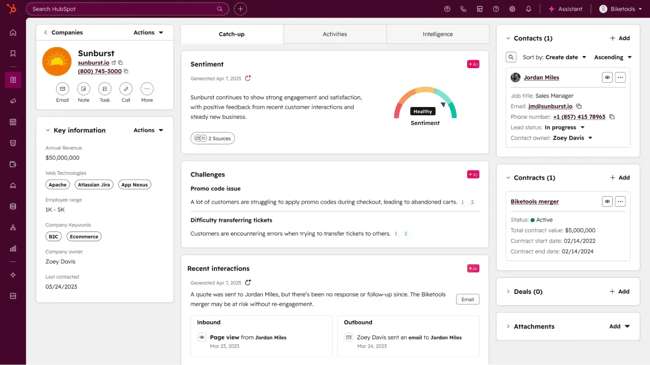
HubSpot’s Smart CRM is an AI-powered customer relationship management platform that not only stores your customer data but also understands and enriches it by unifying structured records, unstructured conversations, and external signals to give teams clear context and actionable insights. It uses AI to automate data enrichment, streamline workflows, detect and merge duplicate records, and surface important insights — helping teams focus more on customers and less on manual tasks.
HubSpot’s Smart CRM provides a unified data foundation for enterprise workflows and connects seamlessly with all of HubSpot’s core products: Marketing, Sales, Service, Content, Data, and Commerce Hubs. The result? Teams get a single, unified view of every customer.
Smart CRM (bundled with HubSpot’s Sales Hub) ranks among the top three CRMs for large companies, according to G2.
- Marketing Hub: It has tools for lead generation and marketing automation — from form builders and ad management to email campaigns and workflows — helping marketers attract and nurture leads efficiently.
- Sales Hub: Provides tools and automations to optimize sales workflow, streamline deal management, and boost productivity. It helps teams engage more prospects, close faster, and accelerate revenue growth.
- Service Hub: Includes live chat, ticketing, call tracking, and survey tools to support and delight customers across every interaction.
- Content Hub: Has everything to create, manage, and optimize content at scale. Includes an AI-powered blog writer, advanced analytics, lead capture, A/B testing, and content embedding.
- Data Hub: Keeps your tech stack running smoothly by syncing data across apps, cleaning customer records, and automating workflows for seamless internal and customer experiences.
- Commerce Hub: Centralizes billing and payment operations. Fantastic for generating invoices and payment links, creating quotes, tracking revenue, and integrating directly with QuickBooks.
HubSpot’s Breeze AI Suite integrates with all the platforms. The Smart CRM also integrates with 1,500+ third-party apps.
What makes Smart CRM stand out is its dual focus: It’s built for startups with big growth ambitions and enterprise clients. It combines intuitiveness with the sophistication to handle complex enterprise needs. 216,000+ customers in 120+ countries use Smart CRM.
Best for: Enterprises with several needs or those seeking an intuitive platform for handling increasing complexity.
What I like: Smart CRM’s ability to combine enterprise-grade functionality with simplicity and ease of use.
HubSpot Pricing
- Smart CRM only: Starts at $75/month
- Smart CRM + Core Product Bundle (Marketing, Sales, Service, Content, Data, and Commerce Hubs): Starts at $4,700/month (includes eight seats)
2. Salesforce
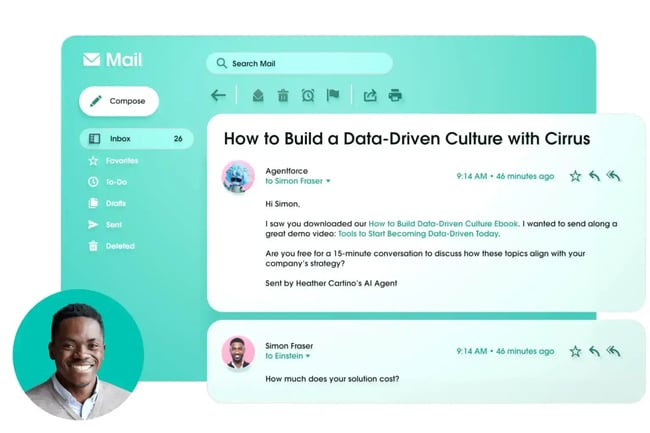
Salesforce is a popular platform, a leading cloud-based crm that helps businesses of all sizes (34% of its clients are enterprise-sized companies) centralize and manage customer data, sales processes, marketing campaigns, service operations, and more in one unified system. Like HubSpot’s Smart CRM, Salesforce integrates its sales, marketing, service, and commerce solutions into a single platform, giving teams a 360-degree view of the customer. Its latest innovation, Agentforce, takes this further.
Agentforce is Salesforce’s suite of autonomous AI agents built directly into the platform. It allows companies to build, customize, and deploy intelligent agents across departments to automate workflows, recommend next best actions, and take action on behalf of employees and customers.
However, Salesforce’s vast capabilities can also be a challenge and overkill for some businesses. One G2 reviewer described Salesforce as “very expensive” and “a bit overwhelming,” despite being an enterprise user and giving it a five-star rating.
Best for: Large enterprises that need maximum customization, complex integrations, and advanced AI automation across multiple departments.
What I like: The depth and scalability of Salesforce’s ecosystem.
Salesforce Pricing: Starts at $100 per user/month
3. Microsoft Dynamics 365
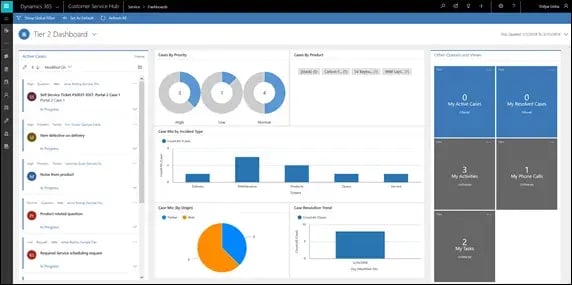
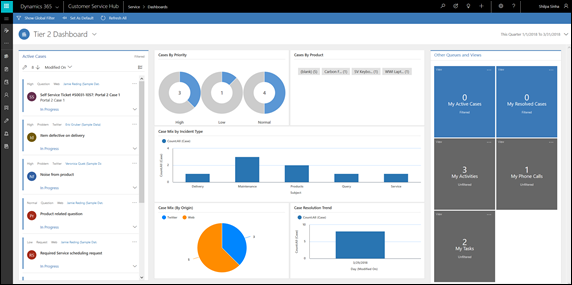
Dynamics 365 is Microsoft’s suite for customer engagement, uniting CRM and ERP capabilities across sales, marketing, service, and supply chain operations.
One of the platform’s key differentiators is its tight integration with the Microsoft ecosystem — including Outlook, Teams, Excel, and Power BI — allowing users to manage customer interactions without constantly switching apps.
Salespeople don’t have to work inside the CRM interface. The platform embeds CRM functionality directly into their daily tools. They can send emails, track deals, and update records directly from Outlook, making adoption smoother and more natural.
Microsoft’s Copilot and Power Platform improve Dynamics 365’s automation capabilities. Copilot leverages generative AI to help users draft emails, summarize meetings, and generate customer insights using natural language commands. Meanwhile, the Power Platform enables low-code and no-code customization, allowing teams to create tailored workflows, apps, and automations without expensive development cycles.
Users praise its customizability but complain about its complex user interface.
Best for: Enterprises already using Microsoft 365 that want a deeply integrated CRM with strong automation, reporting, and customization capabilities.
What I like: Dynamics 365 combines Microsoft’s familiar productivity environment with enterprise-grade power — making CRM adoption easier while offering advanced AI and low-code flexibility.
Microsoft Dynamics 365 Pricing: Starts at $70 per user/month.
4. SAP

Title: SAP-enterprise-CRM-software
SAP is primarily an ERP platform, but it also includes CRM capabilities. This explains why it doesn’t sell its CRM as a standalone product. It’s bundled with other solutions such as the Sales Cloud (for sales teams) and Service Cloud (for customer service teams).
SAP Sales Cloud is particularly common among enterprise buyers who make up 46% of its clients. Users praise SAP’s ERP for being one of the most comprehensive in the market, especially in industries with complex operations. However, many enterprise users also say they “wish the Sales Cloud CRM platform offered easier customization options.”
Some also say SAP Sales Cloud’s initial setup is quite complex, which raises the software’s time-to-value and requires specialized expertise. Others mention that while the system is extremely powerful, it can feel rigid and is better suited for large, structured organizations than agile teams seeking fast experimentation.
Best for: Large enterprises that need end-to-end visibility and tight alignment between CRM, ERP, and supply-chain operations.
What I like: SAP’s ability to create a unified commercial core for enterprises already running on SAP’s back-end systems, such as S/4HANA (for finance, procurement, and manufacturing), Ariba (for procurement), and SuccessFactors (for HR).
SAP Pricing: Starts at $138 per user/month.
5. Floww.ai
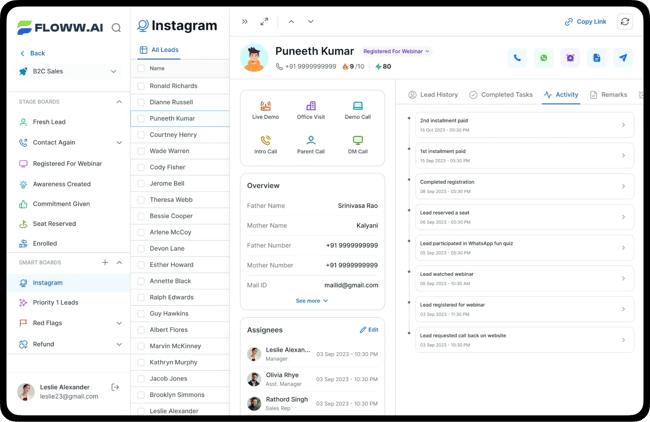
Floww.ai is an AI-powered CRM and workflow automation platform designed primarily for B2C and B2B2C sales organizations. It emphasizes no-code configuration, agile pipelines, and rapid analytics, helping teams pivot quickly and adapt to shifting market demands. Half of its users are enterprises, and most are from the Asia region.
The promises of Floww.ai align with its user reviews, which show it delivers immediate usability, flexible workflows, and strong automation. Its website also claims it won three G2 Best Enterprise Software awards in Winter 2024, including the Best Relationship, Easiest To Use, and Most Implementable badges.
However, one user mentioned that Floww.ai’s customization options are limited compared to some CRMs.
Best for: Rapid-growth companies (especially in B2C and B2B2C) that need to move fast, reduce manual sales processes, and scale without heavy tech overhead.
What I like: Floww.ai’s intuitive no-code setup and agile pipeline architecture, which lets sales teams run and optimize their workflows without months of implementation.
Floww.ai Pricing: Offers custom pricing.
Frequently Asked Questions About Enterprise CRM Software
Is an SMB-ready CRM enough for a global enterprise?
Usually not. SMB-focused CRMs aren’t designed for enterprise-scale data volumes, governance requirements, or cross-functional processes, so they often break down as teams and regions multiply. They also lack the flexibility needed to support complex hierarchies, advanced permissions, and large-scale integrations. While they can work as a temporary solution, most enterprises quickly outgrow them.
How can we quickly validate a vendor’s security and compliance?
Start by requesting their latest SOC 2 report, data residency documentation, and an overview of how their permission and audit models work. Reliable vendors should have these materials ready and be comfortable walking you through them. If they delay, deflect, or cannot provide details in writing, it’s usually a strong indicator of underlying risk. Fast transparency is a baseline expectation for enterprise-grade software.
What’s the best way to handle multi-brand or multi-org structures?
Choose a CRM that supports business units, sub-organizations, and regional segmentation under a single architecture. This ensures each brand or team can operate independently while still sharing data, governance, and reporting where appropriate. Role-based access controls are essential so users only see what they should. A single, partitioned system is almost always more cost-efficient and manageable than multiple disconnected CRMs.
How long does an enterprise CRM migration take?
Migrations can take a few weeks to several months, depending system complexity and how many integrations are involved. Projects move faster when organizations have clear ownership and decisions aren’t bottlenecked. Preparing data — cleaning, deduplicating, and mapping — often takes more time than the technical lift itself. A well-scoped plan and early stakeholder alignment significantly reduce delays.
Do we need an AI roadmap before buying an enterprise CRM?
Not necessarily, but you do need a CRM that is architecturally ready for AI. That means strong data governance, automation capabilities, and unified records that an AI layer can learn from. Even if your AI strategy evolves later, the CRM should make it easy to plug in new models and tools. Platforms that treat AI as an add-on rather than a core capability will limit you long-term.
Growing With Your Enterprise CRM
Choosing an enterprise CRM won’t happen on a whim: It will take time.
But the fact is, as your company scales, the cracks in basic CRMs become glaring — data silos grow, manual tasks slow teams down, and leaders lose visibility.
Enterprise CRMs step in with automation, AI-powered insights, and connected workflows that keep up with growth. If you’re hitting those limits, it’s a clear sign you’ve outgrown small-business CRMs. And if you’re ready for that next step, HubSpot CRM gives you an all-in-one platform built for scale, intelligence, and speed. Explore our full CRM and AI capabilities.
