
Sales leaders are pushing to do more with less. Quota attainment is dropping, deal cycles are stretching longer, and reps are juggling too many tools that don’t talk to each other. The pressure to deliver a consistent pipeline without burning out has never been higher.

Outreach and Salesloft have emerged as the two dominant sales engagement platforms in the market. Both promise to streamline outbound workflows, increase rep productivity, and surface insights that help managers coach more strategically.
But beneath the similar positioning, these platforms differ in meaningful ways. The choice between them can determine whether sequences feel intuitive or clunky, whether data syncs cleanly or creates duplicates, and whether managers spend their time coaching or troubleshooting integrations.
This comparison breaks down how Outreach and Salesloft stack up across the dimensions that matter most for team performance.
Table of Contents
- Outreach vs. Salesloft: Which platform improves team productivity?
- Outreach vs. Salesloft vs. Hubspot Feature Comparison
- Outreach vs. Salesloft vs. HubSpot: Pricing and Total Cost of Ownership
- Frequently Asked Questions about Outreach vs. Salesloft
Outreach vs. Salesloft: Which platform improves team productivity?
Sales engagement platforms improve productivity by addressing three core levers:
- Sequence automation and cadence management. Reps need multi-channel workflows that execute consistently without manual effort, freeing time for live conversations.
- Activity visibility and pipeline tracking. Managers require real-time dashboards that surface which reps are hitting activity benchmarks and where deals are stalling.
- CRM sync reliability and data hygiene. CRM sync reliability and data hygiene. When contact updates, call logs, and email opens flow cleanly into popular CRM examples like Salesforce or HubSpot, teams avoid duplicates and lost context.
When Outreach Works Best
Outreach fits high-volume SDR teams running complex, multi-threaded sequences across large account lists.
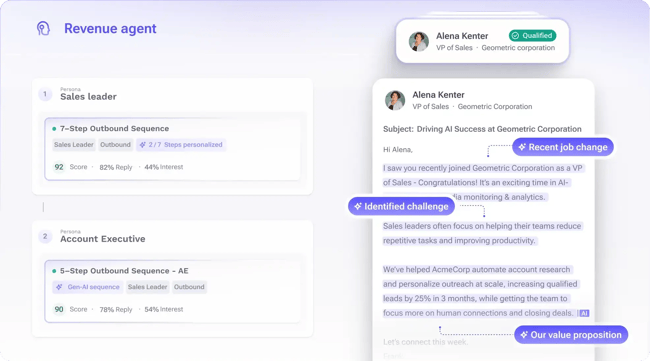
The platform excels at orchestration but requires dedicated admin resources. Outreach is particularly strong for Salesforce-centric organizations, with deep native integration and forecasting tools built specifically for Salesforce environments.
When Salesloft Works Best
Salesloft works well for mid-market sales teams prioritizing coaching visibility and conversation intelligence.
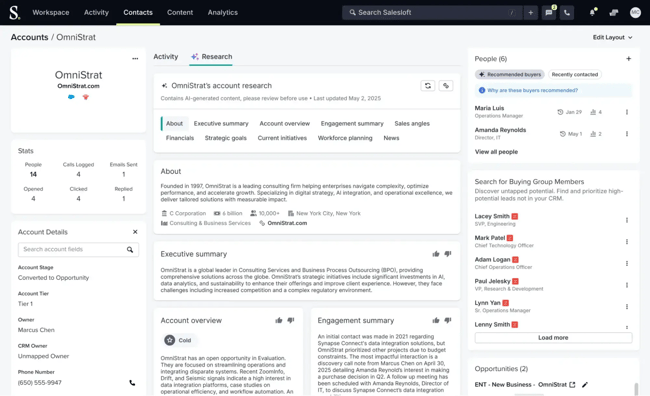
The platform is known for its user-friendly interface and strong analytics capabilities, including real-time dashboards and AI-powered forecasting. Onboarding is faster than Outreach, with most teams reaching full productivity within weeks rather than months.
When to Opt for HubSpot
For teams already operating inside HubSpot’s ecosystem, Sales Hub offers a third option. It delivers engagement features without forcing reps to toggle between systems.
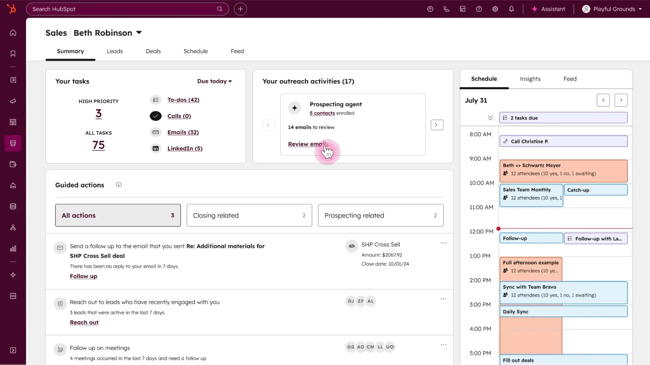
The trade-off is less sequencing depth, but the unified data model and lower learning curve appeal to growing teams that value simplicity over advanced automation.
Outreach vs. Salesloft vs. Hubspot Feature Comparison
Outreach, Salesloft, and HubSpot Sales Hub all handle the basics of sales engagement, but they differ in how deep their features go and how much setup they require.
Outreach offers the most powerful sequencing and reporting, built for teams running complicated outreach across multiple stakeholders. Salesloft strikes a balance between automation and coaching tools, making it a strong pick for managers who want to develop reps while tracking activity.
HubSpot Sales Hub keeps things simpler by living inside the CRM. Unification means less tool-switching and faster onboarding.
Here’s a breakdown of each platform’s features.
Sales Engagement and Sequencing Workflows
Sequencing determines how reps coordinate touchpoints without manual tracking. Strong sequencing tools let teams build multi-step cadences, pause outreach when a prospect replies, and route leads through different paths based on behavior. The sophistication of sequence logic impacts how many prospects a rep can manage without losing personalization or dropping follow-ups.
Here’s where Outreach, Salesloft, and HubSpot Sales Hub differ in their approach to sequences and engagement orchestration.
Platform | Key Features | Pros | Cons |
Outreach | Multi-channel sequences. Advanced sequencing. AI-assisted email drafting. | Strongest depth for complex, multi-stakeholder outreach. High automation reduces manual follow-up. | Requires more setup and admin effort. Steeper learning curve for smaller teams. |
Salesloft | Cadences for email, calls, and follow-ups. Automated follow-up scheduling. Real-time engagement alerts. | Very strong for structured, repeatable outbound motions. Engagement alerts help reps prioritize active leads. | Fewer advanced sequencing controls vs. Outreach. |
HubSpot Sales Hub | Email-first sequences with tasks for calls and follow-ups. Automated follow-up steps and reminders. Dynamic sequences that adapt to engagement. | Easiest adoption for teams already in HubSpot. Cleaner, simpler setup for small and mid-sized teams. Strong alignment between marketing, CRM, and sales outreach. | Less multi-channel depth compared to Outreach/Salesloft. Sequence customization more limited for advanced use cases. |
For teams running enterprise ABM plays with 10+ stakeholder threads per account, Outreach delivers the sequencing depth teams need. Salesloft hits the sweet spot for mid-market teams that want strong automation without the complexity overhead. But if sequences are primarily email-driven with phone and task follow-ups, HubSpot Sales Hub handles those workflows natively while keeping everything inside the CRM.
Email, Dialer, and Multichannel Communication Tools
Reps need to reach prospects wherever they‘re most responsive, whether that’s email, phone, video, or social. Multichannel tools consolidate communication into one interface, so reps aren’t switching between apps to log activity. Built-in dialers, email tracking, and LinkedIn integration determine how fast reps can execute their daily activity benchmarks.
Let’s break down how each platform handles multichannel outreach and calling functionality.
Platform | Key Features | Pros | Cons |
Outreach | Email templates, tracking, and automated replies. Call steps supported inside sequences. LinkedIn/social steps supported through task-based steps. | Good multichannel flexibility through email, call tasks, and social tasks. Strong for teams wanting structured outreach with varied touchpoints. | Social/LinkedIn actions are task-based, not deeply native channels. Full multichannel execution may require integrations. |
Salesloft | Native dialer & messenger. Multi-channel cadences (email, calls, SMS/messenger). Automatic logging of all communications to CRM. | Strongest native dialer and SMS experience among the three. True multi-channel outreach (email, voice, text) in one place. | Social media/LinkedIn steps are not deeply native channels. Advanced dialer/SMS capabilities are typically on higher tiers. |
HubSpot Sales Hub | Native email sequencing, templates, tracking, and scheduling. Browser-based click-to-call with automatic call logging & recording. Shared inbox + calling integrated inside CRM. SMS/WhatsApp/social channels available via third-party integrations. | Easiest adoption for teams already using HubSpot CRM. Simple, unified communication workflow. Marketplace apps allow teams to expand into SMS/WhatsApp when needed. | Native multichannel is limited to email and voice. Requires integrations for SMS, WhatsApp, or advanced dialer features |
Salesloft owns the native dialer and SMS space, making it the strongest choice for high-touch, phone-heavy outbound teams. Outreach covers multichannel through task-based steps, which works but feels less integrated.
HubSpot‘s browser-based calling and email tracking won’t match Salesloft’s dialer specialization. However, for teams where email remains the primary channel and phone is secondary, the unified inbox eliminates the friction of switching between tools. If a team isn’t running a dedicated SDR org making 100+ calls daily, the trade-off favors simplicity.
Task Automation and Productivity
Task automation reduces the manual work that slows reps down, like logging calls, setting reminders, or updating contact fields after every interaction. Platforms that automate these repetitive steps give reps more time for actual selling. The best tools also surface the next-best action so reps don’t waste time deciding what to do next.
Here’s how Outreach, Salesloft, and HubSpot stack up on automation and productivity features.
Platform | Key Features | Pros | Cons |
Outreach | AI-driven workflows that automate research. Workflow-first platform that orchestrates multiple sales tasks across stages. | Strong automation for complex task orchestration across the sales process. | Because of its depth and AI focus, may require more configuration and optimization. |
Salesloft | Workflow automation for sales tasks and CRM updates. Productivity features, like notifications, task assignment, scalable coaching, and workflow templates. | Excellent for standardizing workflows and increasing productivity across a sales team. | While strong in workflow automation, may be less focused on ultra-light usability for very small teams. Some advanced automation features may require a higher tier. |
HubSpot Sales Hub | Task creation, lead rotation, follow-up scheduling, workflow triggers. Dashboards for tasks, calendar sync, and personalized sequences tied to CRM data and triggers. | Well-integrated productivity and automation for teams already in the HubSpot ecosystem. Easier to adopt for smaller/mid-sized teams. | Some automation features may not be as deep or specialized as “pure” sales automation tools. |
Adoption speed varies significantly between the platforms. Salesloft typically gets reps productive faster thanks to cleaner onboarding workflows and a more intuitive interface. Outreach takes longer to master and may require dedicated admin support, but that investment pays off for teams running sophisticated multi-stakeholder campaigns.
HubSpot has the shortest ramp time of the three, especially when teams are already familiar with the CRM. Most reps can execute sequences within days of setup.
Reporting, Dashboards, and Sales Analytics
Sales managers need visibility into what’s working and where reps are falling short. Dashboards that track email open rates, call connection rates, and sequence performance help leaders identify bottlenecks before they hurt pipeline. The depth of reporting determines whether managers can diagnose problems quickly or have to export data into spreadsheets.
We’ll compare how each platform delivers analytics and reporting for frontline managers.
Platform | Key Features | Pros | Cons |
Outreach | Pre-built and customizable reports covering sales execution, team performance, and sequence performance. | Strong visibility into sequences and team performance with dedicated reports. Custom dashboards let managers tailor views for pipeline health and activity. | Dashboard/data setup may require more resources for full customisation. |
Salesloft | Analytics and reporting module offering real-time dashboards, trend analysis, team and individual metrics. Forecast dashboard built in for team forecast and pipeline visibility. | Excellent for teams needing real-time visibility into activities and outcomes. Forecasting and pipeline tools help link activity to revenue outcomes. | Might require higher-tier plans or add-ons for full forecast/pipeline depth. |
HubSpot Sales Hub | Visual report builder and dashboards. Sales reporting covering pipeline, team performance, prospecting touches, conversions. Custom report builder with advanced fields, datasets, and export options. | Seamlessly integrated into CRM. Good for teams that want unified visibility across sales and CRM activities. Easier onboarding and adoption for small-mid teams. | Native analytics may be less bespoke or deep compared to tools built specifically for sales ops/forecasting. |
Outreach shines when teams need workflow orchestration across complex sales cycles with custom triggers and multi-stage automation. Salesloft automates repetitive work well and standardizes processes across teams.
HubSpot’s automation may not match the depth of pure-play sales tools, but it delivers the most that most teams actually use without forcing reps to context-switch. The productivity gain from a unified system often outweighs the power features teams think they need but rarely configure.
Forecasting, Pipeline Management, and Deal Insights
Accurate forecasting depends on understanding which deals are progressing and which are at risk. Pipeline management tools surface deal health, track next steps, and flag when opportunities go stale. The tighter the connection between engagement activity and deal data, the easier it is for managers to predict what will close.
Platform | Key Features | Pros | Cons |
Outreach | Pipeline dashboards showing quantity, quality, and maturity of deals. Forecast roll-up and scenario-planning tools to project revenue. | Helps revenue leaders gain better pipeline visibility and forecasting confidence. Strong for monitoring pipeline health and deal risk across teams. | Forecasting currently supported only for Salesforce CRM. Configuration may require setup of opportunity records and line-item currency fields. |
Salesloft | AI-powered forecasting with deal data, historical trends, and engagement signals. Pipeline dashboards with alerts for deal gaps, stage-time tracking, and pipeline coverage. | Advanced forecasting accuracy with AI support. Good for identifying risks, bottlenecks, and improving pipeline coverage | Feature set may be complex and more suited for larger or mature teams. |
HubSpot Sales Hub | Fully customizable pipelines to create deal stages, manage movement, and track metrics. Forecasting tools with weighted pipelines, historical snapshots, and filterable views. Deal-insight dashboards to view team performance. | Seamless pipeline and forecasting within the CRM, making it a strong fit for mid-sized teams. Easier setup and lower barrier to entry. Clear visibility of deals, stages, and performance across the team. | Forecasting and deal-insight depth may not match specialist platforms for large-scale revenue operations. |
Outreach and Salesloft both offer robust analytics suites with customizable dashboards and deep sequence metrics. Salesloft edges ahead with real-time visibility and built-in forecasting dashboards.
HubSpot’s native reporting works best for frontline managers who need clean visibility into activity, pipeline, and rep performance. HubSpot’s CRM delivers without requiring a separate analytics login.
CRM Integration, Data Sync, and RevOps Alignment
Clean CRM data keeps sales, marketing, and RevOps aligned on a single source of truth. When engagement platforms sync activity, teams avoid duplicate records and missing context. Integration quality determines whether a tech stack amplifies productivity or creates more manual cleanup work.
Here’s what to expect from each platform when it comes to CRM sync and revOps workflows.
Platform | Key Features | Pros | Cons |
Outreach | Bi-directional CRM sync with activity data. Sync interval configurable (pulls updates every ~10 minutes by default) to keep CRM data current. CRM integration toggles and field-mapping control for admin configuration. | Ensures engagement data flows into CRM automatically, reducing manual data entry. Offers strong control for RevOps/admins over when and what data syncs. | Integration setup may require technical/admin resources. |
Salesloft | No-code CRM integrations and partner ecosystem to align sales, success, and marketing workflows. Logs sales engagement activity into CRM automatically to keep CRM accurate. | Strong for teams aiming to build a true RevOps engine. Automatically logging communication activity into CRM improves data hygiene and gives RevOps visibility. Integration flexibility helps align many systems. | Might require higher maturity in RevOps to take full advantage. For simpler use-cases (just sales outreach), some integrations may feel more complex than needed. |
HubSpot Sales Hub | Centralized CRM platform with built-in data management and operations features designed for alignment of sales, marketing, and service teams. Tools and workflows to implement a RevOps framework: shared data model, automated routing, unified reporting across teams. Integration capabilities to sync external systems, enforce data quality, and automate cross-team workflows. | Best suited for organizations seeking to align marketing, sales, and customer success on one platform. Unified CRM and operations features simplify RevOps alignment. Built-in data sync and quality tools reduce friction in cross-team hand-offs. | Highly custom or complex RevOps stacks (many external systems) might require supplemental integrations or third-party tools. |
Existing tech stacks should heavily influence this decision. Teams already operating in HubSpot will find that Sales Hub eliminates integration risk entirely. There’s no middleware to maintain, no sync delays, and no duplicate record issues.
For organizations using Salesforce or other CRM types, both Outreach and Salesloft offer native integrations with robust bi-directional sync capabilities. However, sync quality and field-mapping complexity vary.
Salesloft tends to perform better for teams prioritizing cross-functional RevOps workflows across sales, marketing, and customer success. Outreach offers more granular sync configuration, which technical admins appreciate. However, smaller teams may find the platform unnecessarily complex.
If the team’s CRM is already handling core sales workflows well, evaluate whether adding a separate engagement platform creates enough value to justify the integration overhead. Teams still learning how to use a CRM often struggle more with integration complexity, making a unified platform the safer choice during early-stage CRM adoption.
Outreach vs. Salesloft vs. HubSpot: Pricing and Total Cost of Ownership
When evaluating Salesloft pricing or Outreach CRM pricing, teams often focus on per-seat costs but miss the total picture — implementation time, admin overhead, and the hidden cost of integration maintenance add up quickly. Here are the common packaging components to understand:
- Per-user seat pricing. Most platforms charge a license fee per user (often per month or per annum), with tiers differing by feature sets.
- Feature tiers/editions. Basic tiers may include email sequences and templates, mid/upper tiers include dialer/SMS, analytics, forecasting, and integrations.
- Add-ons and modules. Additional modules such as dialer minutes, analytics packs, wider integrations, ramp-up coaching, or onboarding services may be extra.
- Contract term commitment. Annual vs. monthly billing matters. Annual contracts usually have a lower per-month cost but require a longer commitment.
- Implementation and onboarding cost. Beyond the license, there are one-time setup costs (data migration, coaching/training, and migration from another system).
- Total cost of ownership (TCO) factors. Remember to factor in the cost of licenses, add-ons, internal admin overhead, and opportunity cost of under-utilization.
Platform | Plans & Add-On Highlights | Approx. Annual Price per User |
Outreach | Engage plan (core sales engagement) Add-ons: “Call” (dialer minutes), “Meet” (conversation intelligence), “Deal” & “Forecast” modules | Custom pricing available upon request |
Salesloft | Standard plan (sales engagement) Add-ons: Unlimited calling/messaging, RevOps modules | Custom pricing available upon request |
HubSpot Sales Hub | Free plan Starter ($20/seat/month annually) Professional ($100/seat/month annually) Enterprise ($150/seat/month annually) | Starter: $180/year/seat, Professional: $1,200/year/seat Enterprise: $1,800/year/seat |
Pro tip: Before committing to a standalone sales engagement platform, review our CRM buyers guide to understand whether a unified system better serves the team’s revenue operations strategy.
Frequently Asked Questions about Outreach vs. Salesloft
Do Outreach and Salesloft integrate natively with HubSpot?
Yes, both platforms offer native HubSpot integrations that sync contacts, activities, and deal data. The integrations push email opens, call logs, and sequence steps into HubSpot contact timelines.
Bi-directional sync quality varies, and some teams report field mapping issues or delayed updates. If HubSpot is the team’s primary CRM, using Sales Hub natively eliminates sync lag and reduces the risk of data conflicts between systems.
Is there a free trial for Outreach or Salesloft?
Neither Outreach nor Salesloft offers self-service free trials. Both require potential buyers to contact sales for a demo and a custom pricing quote. Trial access is typically granted during the evaluation process, but it’s gated behind sales conversations.
HubSpot Sales Hub offers a free tier with basic engagement features and a 14-day trial of premium tools, making it easier to test functionality before committing to a contract.
Which has the stronger mobile experience?
Salesloft’s mobile app receives higher marks for usability and feature completeness. Reps can execute tasks, make calls, and review sequence performance on iOS or Android without major limitations. Outreach offers mobile access, but some users report that certain workflows feel clunky or require desktop follow-up.
HubSpot’s mobile app covers CRM and engagement basics well, though power users may find advanced sequencing harder to manage from a phone.
What’s the best option if I need marketing automation?
If marketing automation is a priority, HubSpot provides the most integrated solution. Marketing Hub and Sales Hub share the same database, so lead scoring, email nurture, and handoff workflows operate seamlessly without third-party connectors.
Outreach and Salesloft focus purely on sales engagement and require separate marketing automation platforms. That setup works for enterprise teams with dedicated MarTech stacks, but adds complexity for growing companies.
Outreach and Salesloft Alternatives
Outreach and Salesloft dominate the sales engagement category, but they aren’t the only options worth considering. Teams exploring Outreach alternatives or evaluating Salesloft competitors often discover that point solutions create integration headaches and force reps to toggle between multiple logins.
A unified platform approach solves this by consolidating engagement, CRM, and analytics into one environment. HubSpot Sales Hub is the most common alternative for teams that want sequencing, calling, and pipeline tracking without stitching together separate tools. When an engagement platform lives inside the CRM, activity syncs instantly, reporting stays consistent, and reps spend less time managing their tech stack.
This matters most for growing teams that lack dedicated RevOps resources to maintain integrations. For those comparing Salesloft alternatives and want to reduce operational overhead, a unified platform deserves serious consideration. The trade-off is less sequencing complexity, but for many teams, the simplicity and speed of deployment outweigh the feature depth they’d rarely use.
Ready to see how a unified platform performs? Try HubSpot Sales Hub free and test sequencing, calling, and CRM sync without adding another tool to the stack.
